




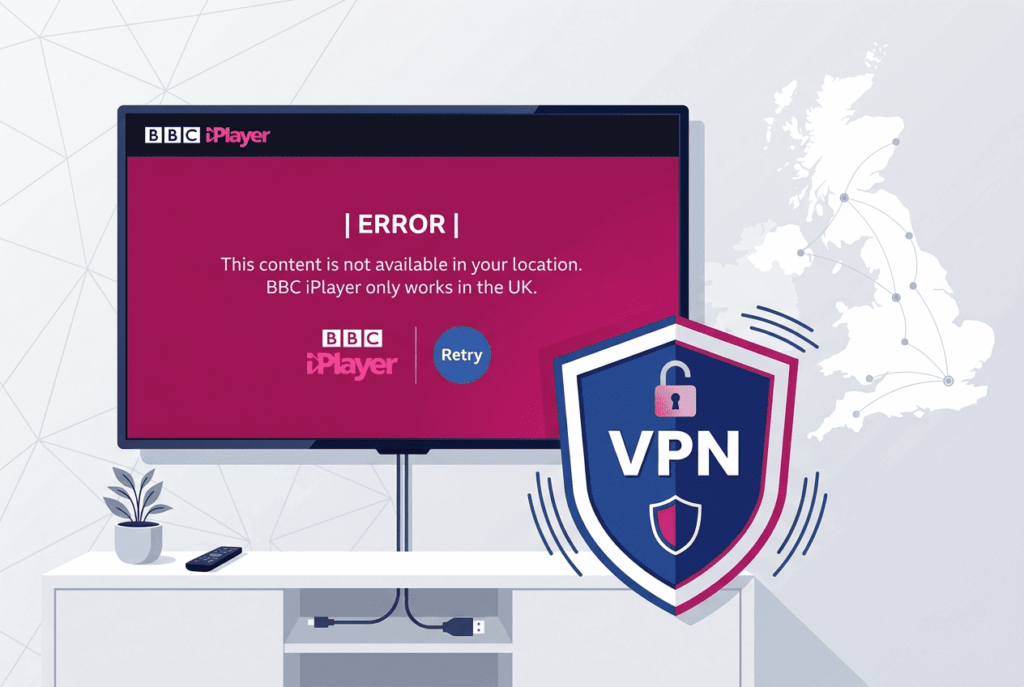
You didn’t come here to shop for a VPN. You came here because something that worked last week, or five minutes ago, suddenly throws an error and the show you wanted won’t load. That’s the problem this guide solves.
- Quick Fix — Try These 5 Steps First
- Why Your VPN Stopped Working — The Six Layers of BBC Detection
- BBC iPlayer Error Codes — Complete Dictionary
- The Complete Fix Checklist — Ordered by Success Rate
- Fixes by Device — Specific Quirks and Workaround
- Creating a BBC iPlayer Account From Outside the UK
- Alternatives When Standard VPN Keeps Failing
- The Legal Reality — Three Separate Questions
- How BBC’s VPN Detection Has Evolved (And Why This Will Keep Happening)
- Frequently Asked Questions
- When to Give Up on Your Current VPN
Here’s what trips most people up. The typical article on this topic quietly answers a different question than the one you’re asking: it ranks providers and assumes that picking the “right” one ends the story. It doesn’t. A VPN can hand you a perfectly valid London IP and iPlayer will still block you, because BBC’s detection runs on six separate layers and your IP is only one of them. Grasp that, and you’ve crossed the line between actually fixing the problem and gambling on yet another subscription.
What you’ll find below: a plain-language breakdown of how BBC catches VPN traffic, a complete dictionary of iPlayer error codes mapped to causes and fixes, a checklist of solutions ordered by how often they work, and device-by-device instructions, because a Fire TV Stick fails for different reasons than a Chrome tab. The legal questions get an honest treatment too, split into the three things people usually confuse.
30-second TL;DR
- Fastest fix: sign out of iPlayer, clear cookies and cache, switch to a non-London UK server, then wait about two minutes after opening the app before pressing play. This alone resolves most cases.
- If you see an error code: jump to the error dictionary. Codes 02062, 02050, and 02066 are VPN/geo-related. Codes 3401 and 3407 are not. Those are DRM and bandwidth issues people mistake for VPN blocks.
- Why a “working” VPN still fails: BBC checks your DNS resolver, browser leaks, cookies, GPS, and VPN protocol signature, not just your IP. Any one of these can give you away.
- If nothing works after a full pass: the issue is most likely your VPN’s IP range being fully blacklisted. Smart DNS, router-level setups, or residential-IP routing are your fallback paths.
- Legal status: using a VPN is legal almost everywhere. Watching iPlayer through one breaches BBC’s terms but isn’t a crime. The only real legal exposure is a UK resident dodging the TV License.
Quick Fix — Try These 5 Steps First
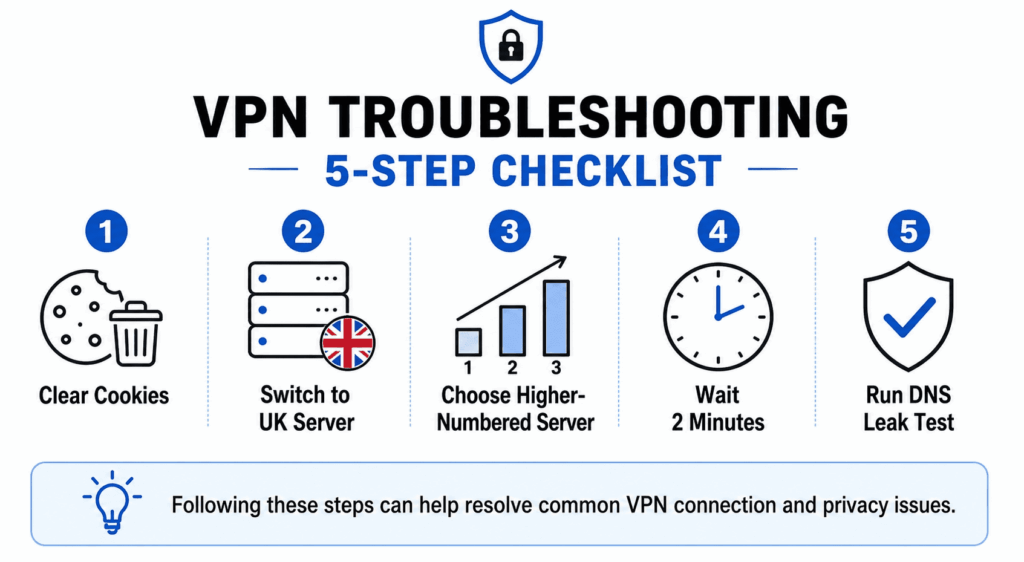
If you don’t want to read 9,000 words, start here. These are the five fixes that resolve the most cases, in order. Work down the list and stop when iPlayer starts playing. If you reach the bottom and you’re still blocked, the detailed sections below get more specific.
1. Clear your cookies, sign out, then sign back in. This is the single most effective first move, and there’s a real mechanism behind it. BBC stores session data that can pin you to “outside the UK” even after your IP changes. Clear cookies and cache for bbc.co.uk (or open a fresh private window), sign out of your account, reconnect your VPN to a UK server, and sign back in. On iPhone and iPad, where there’s no cache-clear button, you’ll need to delete and reinstall the app instead.
2. Switch to a UK server that isn’t in London. London servers carry the most users, and BBC flags an IP when too many people stream through it at once. Pick Edinburgh, Manchester, Glasgow, or Belfast instead. Fewer users on those servers means a lower chance you’ve landed on an address that has already tripped a behavioral flag.
3. Try a higher-numbered server. Within a city, providers number their servers, and the newer ones (the higher numbers) have had less time to accumulate the user load and blacklist exposure that gets an IP flagged. One Reddit user put it simply: “Picking the newest servers seems to help (highest number, usually non-London).” On NordVPN, type “United Kingdom” into the search box and choose the highest-numbered result.
4. Wait two minutes after opening the app. This one sounds absurd, and users say so themselves. It’s been called “absolute witchcraft” on the iPlayer subreddit. Open the app, sign in or pick your profile, then wait at least two minutes before selecting anything to watch. People report it working repeatedly on Samsung TVs, Fire TV Sticks, NVIDIA Shield, and Chromecast. The leading theory is a caching quirk on BBC’s side. I can’t fully explain it either, but enough people confirm it that it belongs near the top of the list.
5. Run a DNS leak test. Go to ipleak.net or dnsleaktest.com while connected to your VPN. If you see DNS servers belonging to your home ISP, your VPN is leaking and BBC can read your real location regardless of your IP. If you see datacenter resolvers showing up in the wrong countries, that can trip BBC’s DNS detection too. Either result points you to the DNS fixes in Tier 3 below.
Still stuck? Then the cause is one of the deeper detection layers, and it’s worth understanding what you’re actually fighting.
Why Your VPN Stopped Working — The Six Layers of BBC Detection
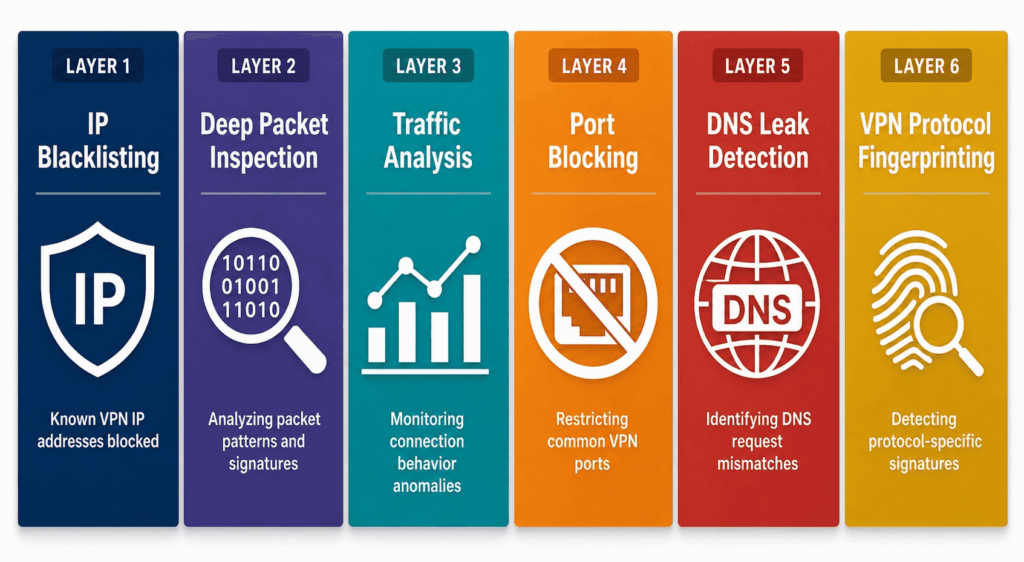
A valid UK IP is necessary but not sufficient, and that single fact explains almost every stubborn failure in this guide. BBC iPlayer runs at least six distinct detection systems, and your IP is only the first. You can pass the IP check and still get blocked by any of the other five. That’s why “just use a better VPN” so often falls flat as advice: it treats a six-part problem as if it had one part.
Walk through the layers and the strange, intermittent nature of iPlayer blocking starts to make sense.
Layer 1 — Datacenter IP Blacklisting
BBC buys commercial databases that catalog which IP addresses belong to datacenters rather than homes. The two named most often are MaxMind’s GeoIP Anonymous IP database and IP2Proxy. These services maintain lists of address ranges assigned to hosting companies, and BBC blocks them in bulk.
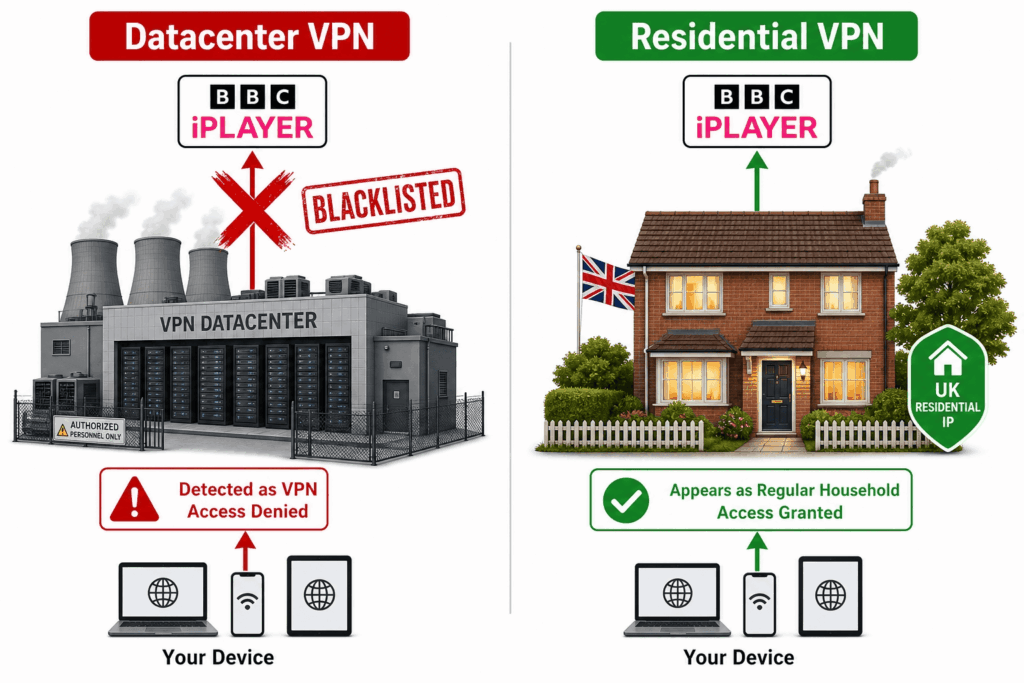
The key word is ranges. BBC doesn’t block one VPN IP at a time; it blocks the entire block of addresses a hosting provider owns. So when a VPN routes you through a server farm run by Hydra Communications, Datapacket, or Cogent Communications, every address in that company’s range is suspect, not just yours. This is also why asking your VPN for a fresh IP rarely helps. The new IP comes from the same flagged range.
AirVPN’s support team described the endgame bluntly: “BBC is progressively restricting access to their services only to IP addresses which have been assigned to residential UK ISPs.” That’s the trap for commercial VPNs. Almost all of them run on datacenter infrastructure, because that’s how you build a fast global network. The one thing BBC increasingly wants to see, an address that belongs to a real British home broadband line, is the one thing a datacenter can’t fake.
Layer 2 — Behavioral Detection (Too Many Streams From One IP)
Even an IP that isn’t on any blacklist can give itself away by how it behaves. A real household has a handful of people watching at once, at most. A VPN server has hundreds of strangers funneled through a single address, and that pattern is easy to spot.
Two thresholds come up repeatedly in user reports. The first is concurrent streams: somewhere around 20 or more simultaneous streams from one IP triggers an automatic flag. The second is account variety. As one Reddit user, jimmysmith1960, explained it: “BBC simply auto-blocks IP addresses with too many users. Just 6 or more different user logins from the same IP address would not happen from a real household. Simple.”
Another user, b2431521, described the same logic from the detection side: “BBC will be blocking IP’s either from publicly available IP lists of VPN services, or on a case-by-case basis, where they detect 20+ streams from one single IP & suspect it is a VPN.” A hypothetical version of the blocking rule that circulated on Reddit captures the escalation: if active stream users exceed five, block for 30 minutes; if they still exceed five after that, block for 24 hours.
This is why London servers fail first, and why the same server can work in the morning and fail at night. The problem isn’t your setup. It’s how many other people happen to be on that address when you press play. It also explains the maddening “worked yesterday, broken today” pattern: an IP gets flagged under load, then quietly recovers once the crowd thins out.
Layer 3 — DNS Resolver Analysis
This is the layer that catches people with an otherwise flawless setup, and it’s the one almost no competing guide bothers to explain.
When your device wants to reach iPlayer, it first asks a DNS resolver to translate “bbc.co.uk” into an IP address. BBC looks at which resolver answered and where it sits relative to UK ISPs. If your IP says London but your DNS queries are handled by a resolver that clearly isn’t part of the UK internet, that mismatch is a red flag.
A case from the ProtonVPN subreddit shows how subtle this gets. A user with a working UK VPN IP was still being blocked. The culprit was their DNS resolver, NextDNS, which was returning Fastly CDN addresses scattered across various European countries. BBC saw the inconsistency and flagged it. The user, SmileyBarry, described the fix: “Looks like it’s very finicky because they’re using some DNS tricks to find out if you’re in the UK or not, and my resolver (NextDNS) is tripping it up… Switching to 1.1.1.1 returns what looks like the right BBC-registered IPs.” Pointing DNS at Cloudflare’s 1.1.1.1, or at Proton’s own resolver, returned proper UK-registered BBC addresses and unblocked the service.
A Pi-hole user hit a related problem from the other direction. NordVPN’s DNS servers, 103.86.96.100 and 103.86.99.100, were resolving through Cogent Communications infrastructure in Germany. The result was effectively a DNS leak that pointed BBC away from the UK even though the VPN tunnel itself was fine. The lesson here is that your IP and your DNS resolver have to tell the same story. When they don’t, BBC believes the DNS.
Layer 4 — DNS, WebRTC, IPv6, and GPS Leaks
A “leak” is any path by which your real location escapes the tunnel. There are four common ones, and each can betray you even while your VPN appears to be working perfectly.
A DNS leak is the most common, and it overlaps with Layer 3: your DNS requests slip outside the tunnel and resolve through your home ISP, advertising your true country. A WebRTC leak is a browser-level issue, since WebRTC is a built-in technology for real-time audio and video that can expose your real IP address directly to a website even when everything else is routed through the VPN. An IPv6 leak happens when your VPN tunnels the older IPv4 traffic but leaves newer IPv6 traffic to travel unprotected, again revealing your location. And on phones and tablets, GPS data is its own giveaway: if your IP says Manchester but your handset’s GPS says Lisbon, that mismatch flags you instantly.
You can check the first three at ipleak.net, dnsleaktest.com, and browserleaks.com. Detailed fixes for each, including how to disable WebRTC in every major browser and how to turn off IPv6, appear in Tier 3 and Tier 4 of the checklist below.
Layer 5 — Cookie and Session Tracking
BBC doesn’t only judge you by your current connection. It remembers your past ones.
The mechanism appears to be cookie-based session affinity, a “sticky bit” in effect, where iPlayer stores state about where you’ve been seen and holds onto it. If your cookies say you accessed the service from outside the UK, a fresh UK IP doesn’t always override that history immediately. The stored state lingers.
A Hacker News post from 2021 documented the most extreme version of this. The user, godelmachine, found that a single session fix wasn’t enough: “The workaround I have found for now is stay logged in from UK NordVPN server for around 2-3 days and then access BBC iPlayer content, then it works.” In other words, they had to convince BBC’s session tracking, over days, that they genuinely lived behind that UK address before iPlayer relented.
You won’t usually need to wait days. But this is precisely why “clear your cookies” is the first step in every troubleshooting guide ever written, including this one. It wipes the stored history that’s pinning you to the wrong country.
Layer 6 — VPN Protocol Fingerprinting
The final layer ignores your IP, your DNS, and your cookies, and looks instead at the shape of your traffic. VPN connections carry telltale signatures that distinguish them from ordinary HTTPS web browsing. Detection systems can learn these patterns and flag the traffic as tunneled regardless of where it appears to originate.
Not all protocols look the same to a fingerprinting system. OpenVPN, the long-established standard, tends to be more detectable. WireGuard, a newer protocol built for speed and a smaller codebase, sometimes slips through where OpenVPN fails on the very same provider. This is why some users report that simply switching protocols fixes the block.
It’s also why providers built obfuscation in the first place. Features marketed as Stealth (Proton), Camouflage and NoBorders (Surfshark), or the proprietary protocols NordLynx (NordVPN) and Lightway (ExpressVPN) all aim, in part, to disguise the fingerprint, making tunneled traffic look like ordinary encrypted browsing. When standard WireGuard gets caught, an obfuscated or stealth mode is the next thing to try.
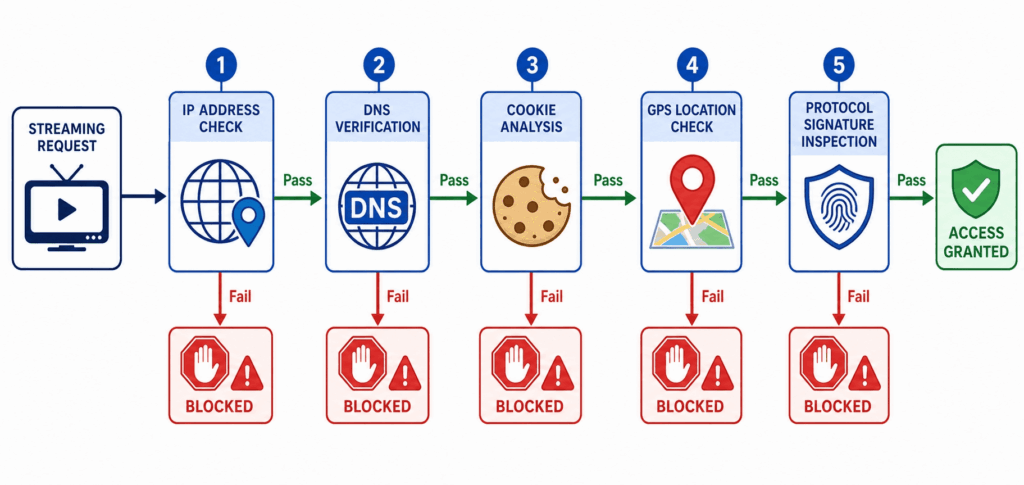
The takeaway
Put the six layers together and the central, counterintuitive fact falls out: a VPN with a correct, non-blacklisted UK IP can still be blocked by Layer 3, 4, 5, or 6. The IP is the part everyone obsesses over and the part that’s easiest to get right. The other five are where most stubborn failures actually live. Keep that map in mind as you work through the error codes and fixes below, because nearly every fix is really an attempt to satisfy one specific layer.
BBC iPlayer Error Codes — Complete Dictionary
If you arrived here by Googling a specific number, this section is for you. iPlayer’s error codes are cryptic, and BBC’s own help pages tend to give one generic fix for all of them. They’re not interchangeable. Some are geo-blocks, some are VPN detections, and two of the most-feared ones have nothing to do with your VPN at all. Knowing which is which saves you from “fixing” a problem you don’t have.
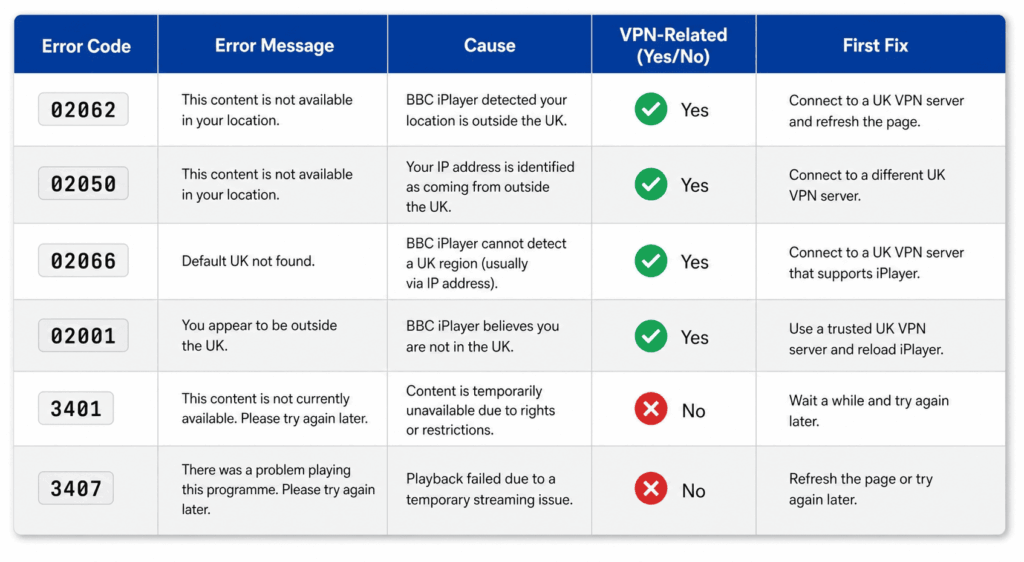
Error 02062 — “BBC iPlayer Only Works in the UK”
This is the classic geo-block, the one most people see first.
The on-screen message reads: “BBC iPlayer only works in the UK. Sorry, it’s due to rights issues.” It appears across browsers on every platform, and on both iOS and Android.
The cause is straightforward. Your IP has been read as outside the UK, or it’s been flagged as a VPN or proxy through one of the commercial blacklists (Layer 1). Either way, BBC has decided you’re not in Britain.
Work the fixes in this order. Clear your cookies and cache, sign out, and sign back in. If that fails, switch to a secondary UK city server such as Edinburgh, Manchester, Glasgow, or Belfast, to dodge the behavioral flags that hit London first. Next, try a higher-numbered server within that city, since newer addresses are less likely to be blacklisted. Then check for a DNS leak at ipleak.net. If you’re in a browser, disable WebRTC to close that leak path. Finally, switch your VPN protocol: if you’re on OpenVPN, try WireGuard, or the reverse, to get past protocol fingerprinting.
Error 02050 — Geo-Restriction Variant and Device Compatibility
This is the tricky one, because it has two completely different causes wearing the same code.
The messages vary: “Sorry, BBC iPlayer isn’t available in your region,” “This content is not available in your location,” or simply “Something went wrong.” It shows up most on Smart TVs, Fire TV Sticks, and Chromecast with Google TV.
The first interpretation is the obvious one, a geo-detection failure in the same family as 02062. The second is easy to miss: it can mean your device itself is no longer supported. As one Amazon UK forum thread put it, BBC had updated the app so it was “no longer compatible with your generation” of hardware. If the device is genuinely obsolete, no VPN change will help.
This code had a notable surge between December 2024 and February 2025, concentrated on Fire TV and TV devices. NordVPN acknowledged it directly through a support ticket: “experiencing technical issues with BBC iPlayer on Firestick and TV devices.”
For the fixes, start with the one users swear by despite its absurdity, the two-minute wait. Open the app, sign in or select your profile, and wait at least two minutes before choosing anything to watch. As one user on the iPlayer subreddit, ADHDDIAGNOSED, wrote: “This makes absolutely no logical sense as to how it would work… But work it indeed does, absolute witchcraft but works every time.” If that doesn’t land, exit iPlayer, play another UK channel for a few seconds, then return. Failing that, switch your VPN server and switch back. Then try setting the device timezone to GMT. Then a higher-numbered server. Then clear the app’s cache and reinstall it. And if none of it works, the device may simply be unsupported, in which case a Smart DNS service or different hardware is the realistic path forward. Several users abandoned their VPN over exactly this error.
Error 02066 — VPN/Proxy Explicitly Detected
When you see 02066, BBC isn’t guessing. It has decided you’re on a VPN or proxy.
The cause is usually a flagged IP, but it can also stem from an app bug, a conflict with other software, or an outdated operating system. Because the detection is more confident here, the fix sequence leans on cleaning up the connection itself.
Clear your browser cache and cookies first. Then, if you can, use a wired Ethernet connection instead of Wi-Fi for a more stable link. Switch to a different UK server, or a different provider entirely. Update the BBC iPlayer app to the latest version. Reboot the device fully, meaning an actual restart rather than just sleep. If it’s still blocked, uninstall and reinstall the iPlayer app. And one honest edge case worth flagging: if you’re physically in the UK and only running the VPN for privacy, the simplest fix is to turn the VPN off. You don’t need it to be in the country you’re already standing in.
Error 02001 — Network Connectivity
02001 is a network-layer error, and it shows up most on Freesat boxes and Smart TVs when a VPN is active. Samsung’s community forum has pages upon pages of these cases across different TV models.
Distinguish it from the geo-blocks: 02001 is about the connection failing or behaving oddly, not about your location being rejected. The fixes reflect that. Clear the iPlayer app’s cache and data, reinstall the app, and confirm your internet connection works independently of iPlayer. Check your VPN protocol setting too, since an unstable protocol can surface as a connectivity error here.
That said, on older Samsung sets, 02001 frequently means the model itself is no longer supported after an app update, the same obsolescence trap as 02050. If you’ve cleared the cache, reinstalled, and confirmed the connection, and a years-old TV still throws 02001, the device is the problem and no VPN can fix it.
Errors 3401 and 3407 — Playback Errors (Not VPN-Related)
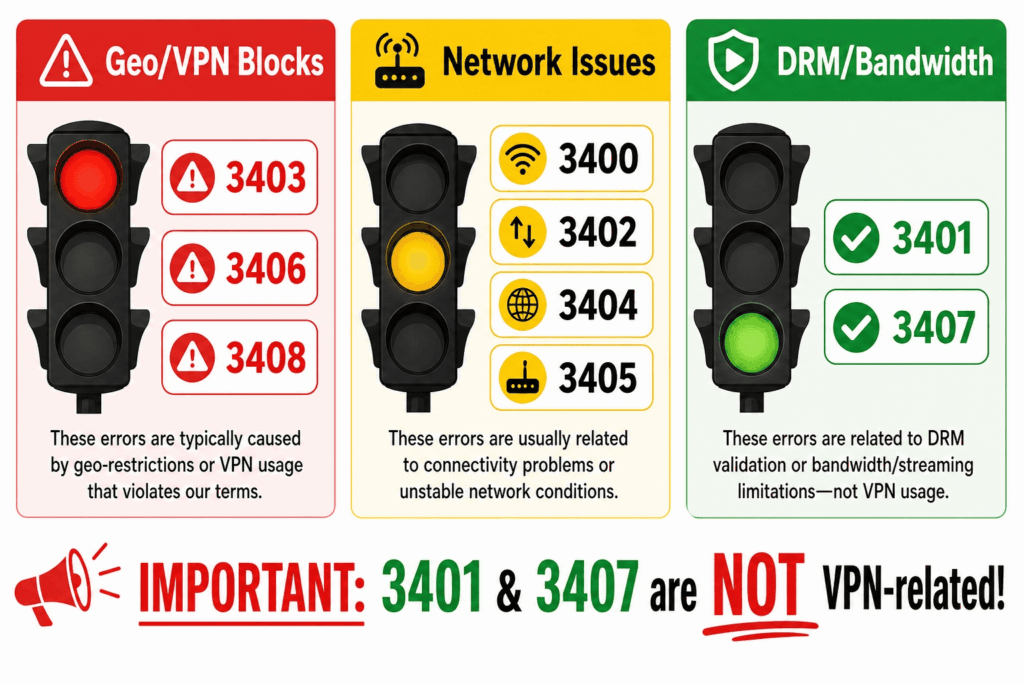
These two get blamed on VPNs constantly, and they almost never deserve it. Treat what follows as a clarification rather than a fix list for your VPN.
Error 3401 is a DRM or HDCP problem. The message reads “There’s a problem playing this programme,” and the cause is either an out-of-date Widevine component (the digital rights management module that decrypts protected video) or an external monitor that doesn’t support HDCP copy protection. To fix it: refresh the page and try again, open a new Incognito window in Chrome to rule out extension conflicts, and if you’re on an external display, switch to your laptop’s built-in screen to test whether HDCP is the culprit. To update Widevine in Chrome, go to chrome://components and click “Check for update” next to Widevine Content Decryption Module.
Error 3407 is a network or stream error, typically caused by an interruption, a BBC server hiccup, or a connection that’s dropped below the roughly 5 Mbps needed for HD. Check your actual connection speed first; you want 5 Mbps or more for HD. Pause and resume the stream. Refresh the page and clear the cache. And if you are on a VPN, try a server closer to your physical location, counterintuitive as that sounds, to cut the routing latency that can starve the stream.
Neither code means BBC caught your VPN. If you’re staring at 3401 or 3407, stop swapping servers and look at DRM and bandwidth instead.
“BBC iPlayer Does Not Work in the UK” (No Code Shown)
Occasionally iPlayer throws a message with no number attached, complaining that it doesn’t work in the UK even when you’re connected to a UK server. This shows up in browser-focused threads on AVG’s and Mozilla’s communities, among others, and points to something broken at the routing or DNS level rather than a clean geo-block.
The fix that resolves it most often is a combination: clear your cache, flush your DNS (commands are in Tier 3 below), and switch browsers. The unnumbered error usually means your DNS or routing is sending mixed signals, and resetting both ends of that tends to clear it.
The Complete Fix Checklist — Ordered by Success Rate
This is the practical heart of the guide. The fixes are grouped into six tiers, from the quick wins that resolve most cases to the heavier options you only reach when you’ve exhausted the rest. Work top to bottom and stop the moment iPlayer plays. There’s no prize for completing every tier.
Each fix maps back to one of the six detection layers, so if you understand why you’re doing something, you can skip whatever doesn’t apply to your situation.
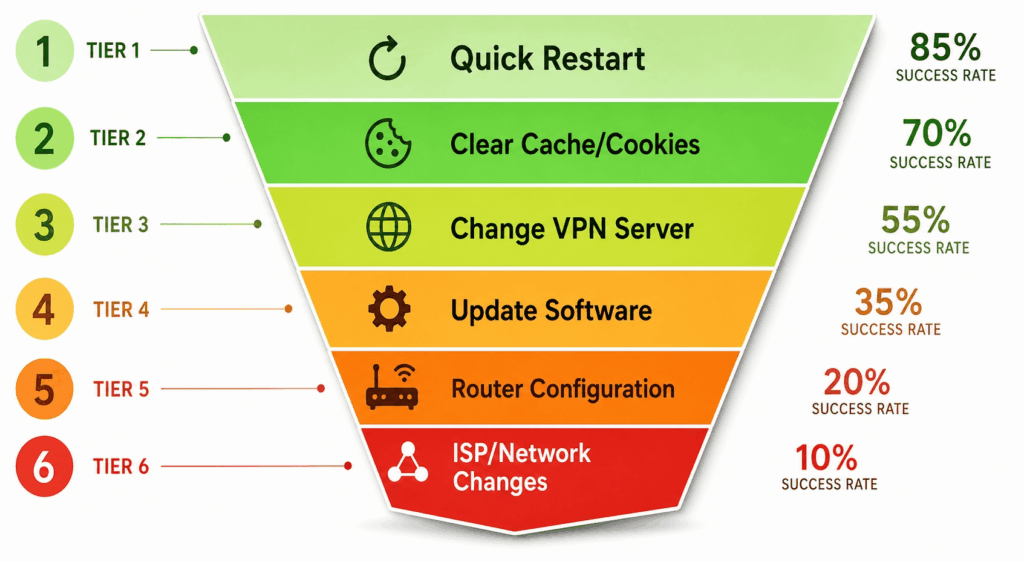
Tier 1 — Quick Fixes (Solves Most Cases)
Clear cookies, sign out, sign back in. Every source agrees on this one because it attacks Layer 5, the stored session state pinning you to the wrong country. In a desktop browser, clear cookies and cache for bbc.co.uk (or just open a private window), sign out of iPlayer, confirm your VPN is on a UK server, and sign back in. On iOS, there’s no cache-clear option, so you delete and reinstall the app instead. On Android, go to Settings → Apps → BBC iPlayer → Force Stop, then Storage → Clear cache.
Switch to a non-London UK server. London carries the heaviest user load, which means London IPs hit the behavioral flag (Layer 2) first. Move to Edinburgh, Manchester, Glasgow, or Belfast. On NordVPN specifically, type “United Kingdom” into the search box and pick the server with the highest number, since the newest servers are least likely to be blacklisted. ExpressVPN’s own suggested order runs East London, then Docklands, then London, then Wembley, then the Midlands. For reference, ProtonVPN users reported these UK servers working in mid-2025: Belfast 670, Edinburgh 658, and London 319.
Force-quit the app, restart the VPN, reopen. A clean slate on both ends clears transient connection states. Fully close the iPlayer app, disconnect and reconnect your VPN to a UK server, then open the app fresh.
Switch server, wait ten seconds, switch back. This sounds like nothing, but it’s documented to work across multiple platforms. Hop to a different UK server, give it about ten seconds, then return to your preferred one. It nudges you onto a fresh connection and sometimes onto a less-loaded address.
Tier 2 — The Counterintuitive “Witchcraft” Fixes
These defy logic, and the people who use them say so out loud. They also work often enough that skipping them is a mistake.
The two-minute wait. Open the iPlayer app, sign in or select your profile, then wait at least two minutes before you select any program. As Ok_Guess_8072 described it on Reddit: “Open the BBC iPlayer app, and login/select user, then wait at least 2 minutes before selecting a program. That is it. As I say, this has worked for me every time.” It’s been confirmed on Samsung TVs, NVIDIA Shield, Fire TV Sticks, and Chromecast. The working theory is a caching issue on BBC’s side that resolves itself if you give it a moment before demanding a stream.
Play another UK channel first. Open a different live UK channel inside iPlayer, let it run for a few seconds, then navigate back to the show you actually wanted. This seems to “warm up” the session into a valid UK state.
Set the device timezone to GMT. A timezone that contradicts your UK IP is a small mismatch that detection can notice, and setting the device clock to GMT removes it. This is especially effective on Fire TV Sticks and is frequently the missing piece for Channel 4 as well as iPlayer.
Tier 3 — DNS and Network-Level Fixes
If Tiers 1 and 2 didn’t do it, the problem most likely lives in Layer 3 or 4, your DNS or a leak. This is where most “I have a perfect UK IP and it still won’t work” cases get solved.
Run a DNS leak test. Go to ipleak.net, dnsleaktest.com, or browserleaks.com while connected. If you see DNS servers belonging to your home ISP, your VPN is leaking DNS and BBC can read your real country. If instead you see datacenter resolvers (Cogent Communications, Datapacket, or similar) appearing in countries that don’t match your VPN location, that inconsistency can trip BBC’s DNS detection on its own. Either result tells you DNS is your problem.
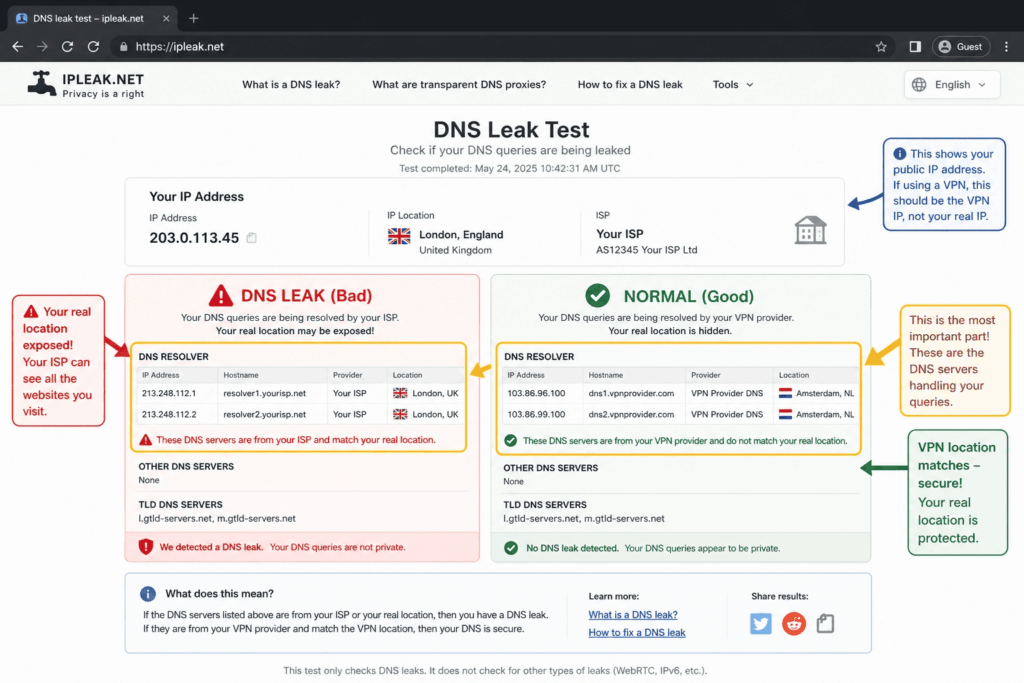
Override your DNS resolver. Set your device’s DNS to Cloudflare’s 1.1.1.1, or to your VPN provider’s own DNS servers, so your IP and your resolver tell the same story. For NordVPN, those servers are 103.86.96.100 and 103.86.99.100. Most VPN apps have a “Use custom DNS” toggle in settings where you can point DNS at the provider’s own resolvers; NordVPN, Proton, and Surfshark all offer this.
Disable DNS over HTTPS (DoH) in your browser. This one is rarely mentioned elsewhere, but it’s a documented step. Secure DNS can route your lookups through a resolver that contradicts your VPN. In Chrome, go to Settings → Privacy and security → Security → Use secure DNS, and turn it off. In Firefox, go to Settings → Network Settings and disable “Enable DNS over HTTPS.”
Flush your DNS cache. Stale DNS entries can keep pointing you the wrong way. On Windows, run ipconfig /flushdns. On macOS, run sudo dscacheutil -flushcache; sudo killall -HUP mDNSResponder. On Linux with systemd-resolved, run sudo systemd-resolve --flush-caches.
Tier 4 — Browser-Level Leak Protection
Browsers leak in ways apps don’t, and WebRTC is the usual offender. If iPlayer fails in your browser but you suspect your VPN is otherwise fine, this tier closes the gaps.
Disable WebRTC to stop your real IP from leaking out of the browser. In Firefox, type about:config in the address bar, search for media.peerconnection.enabled, and set it to false. Chrome has no native toggle, so install a WebRTC leak-prevention extension. In Safari, open the Develop menu → WebRTC and disable the Legacy WebRTC API. Edge behaves like Chrome and needs an extension. If you use Proton’s browser extension, WebRTC blocking is built in.
Disable IPv6 if your VPN doesn’t tunnel it. On Windows, open your network adapter’s properties and uncheck “Internet Protocol Version 6 (TCP/IPv6).” On macOS, go to System Preferences → Network → Advanced → TCP/IP and set Configure IPv6 to “Link-local only.”
Use a dedicated browser for iPlayer. Some people find Firefox works where Chrome fails, or the reverse. The cleaner approach is the two-browser strategy: dedicate one browser exclusively to iPlayer with the VPN always on and leak protection in place, and keep your everyday browser separate. It isolates the variables, so a stray extension or setting in your main browser can’t quietly break your stream.
Tier 5 — VPN Configuration Tweaks
If you’ve ruled out DNS and leaks, the remaining suspect is the tunnel itself, which is Layer 6.
Switch your VPN protocol. Cycle through what your provider offers: WireGuard, OpenVPN, IKEv2, and any proprietary option like NordLynx, Lightway, or Stealth. Because protocols carry different fingerprints, one can pass where another is caught. Mullvad users specifically report success with WireGuard combined with multi-hop. ProtonVPN users report the Stealth protocol working when standard WireGuard fails.
Enable obfuscated or stealth servers if your provider has them. These disguise your traffic to look like ordinary HTTPS, defeating protocol fingerprinting. NordVPN groups these under an “Obfuscated Servers” category. Surfshark calls the relevant features Camouflage Mode and NoBorders Mode. ExpressVPN applies obfuscation automatically on certain protocols.
Turn off VPN-side features that interfere. Built-in security extras can break streaming. Disable NordVPN’s Threat Protection (or Threat Protection Pro), Surfshark’s CleanWeb, and any bundled ad blocker. Switch off third-party web protection too, like an antivirus’s internet shield. And disable Location Services on the device entirely, so there’s no GPS signal to contradict your IP. One documented case: a user had iPlayer working in Safari on iPhone with NordVPN, but Channel 4 stayed blocked until they turned off Threat Protection.
Tier 6 — When Nothing Else Works
You’ve cleared cookies, swapped servers, fixed DNS, closed leaks, and changed protocols, and iPlayer still won’t budge. At this point the likely truth is that your VPN’s IP ranges are thoroughly blacklisted, and the fix is structural rather than a setting.
Contact your VPN’s live chat. Support can often point you to a server that’s working right now, in real time, which beats guessing. NordVPN, Surfshark, and ExpressVPN all run 24/7 chat. This is frequently faster than another hour of self-troubleshooting.
Try a dedicated IP, with realistic expectations. A dedicated IP can help, but only if its range isn’t already flagged. One Pi-hole case showed a NordVPN dedicated IP in the 185.16.x.x block sitting inside a flagged Hydra Communications datacenter range, still blocked. A dedicated IP is more useful for things like banking than for beating iPlayer.
Set up the VPN on your router. Running the VPN at the router level makes every device on your network appear to be in the UK at once. It’s the only practical way to cover Chromecast, Apple TV, Smart TVs, and game consoles, and it solves them all in a single setup.
Switch to Smart DNS instead of a VPN. Smart DNS redirects only the DNS lookups for streaming sites, with no encryption and no IP masking. That makes it faster and harder for BBC to detect, at the cost of any privacy benefit. ExpressVPN’s MediaStreamer is included with its subscription, and NordVPN’s SmartDNS is included too (though it was broken from December 2024 into January 2025). StreamLocator and SmartDNSProxy are dedicated services. The full rundown is in the Alternatives section.
Use MeshNet through a UK device. NordVPN’s MeshNet can route your traffic through a trusted device on another network. If you have family or a friend in the UK with a NordVPN account, you can route through their home connection and appear as a genuine residential UK user, which is essentially undetectable as a VPN, because it isn’t one in the way BBC’s blacklists understand.
Build your own VPN on a UK cloud server. For technical users, renting a UK cloud server and running your own VPN sidesteps the commercial blacklists. One Reddit user confirmed StrongSwan IKEv2 on an AWS EC2 instance in London works, because AWS isn’t aggressively blocked by BBC. Expect $30–50 a month and a willingness to handle Linux administration and firewall rules. The full picture, including the trade-offs, is in the Alternatives section below.
Fixes by Device — Specific Quirks and Workaround
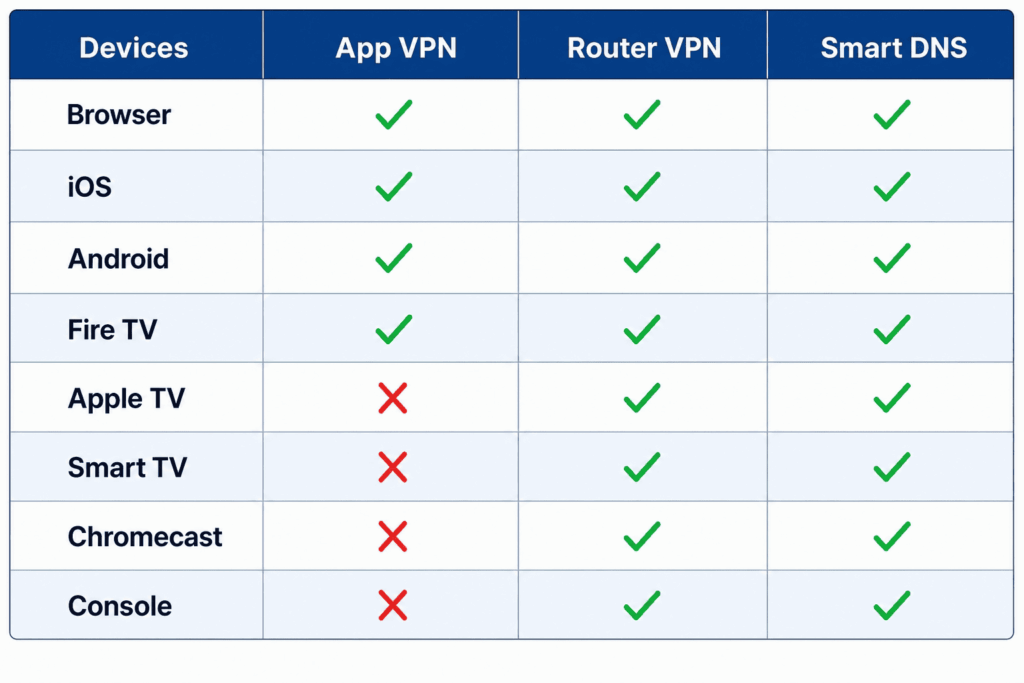
Real hardware doesn’t cooperate as neatly as the generic advice “connect the VPN, open iPlayer, done” suggests. A Fire TV Stick fails for reasons a Chrome tab never will, an Apple TV can’t run a VPN at all, and a Chromecast can betray you even when your phone is perfectly protected. This section is organized by device class so you can jump straight to yours.
Windows and macOS Browsers
This is the easiest case, which is why it’s worth starting here even if it’s not your situation. Everything else is a harder version of this.
On a desktop, you have full control over cookies, DNS, leaks, and protocols, so the entire checklist above applies cleanly. One choice matters: a browser extension versus the full VPN app. The provider extensions from NordVPN, ExpressVPN, Surfshark, and Proton tunnel only your browser traffic, which is often better for streaming than routing your whole system, because it isolates iPlayer from anything else that might leak. The extensions also tend to bundle WebRTC blocking, closing one of the most common browser leaks automatically.
The cleanest desktop setup is the two-browser strategy: dedicate one browser to iPlayer with the VPN extension always on and leak protection in place, and keep your normal browser separate for everything else.
iPhone and iPad (iOS)
iOS adds two obstacles a desktop doesn’t have: an app store lock and aggressive location handling.
The BBC iPlayer app requires a UK Apple ID to download, so a US or other-region account simply won’t find it. The workaround is to create a UK Apple ID with a UK postcode, and no payment method is required for free apps. If you’d rather skip that entirely, you can use Safari at bbc.co.uk/iplayer instead of the app, which avoids the store lock completely.
Location is the bigger headache on recent iOS. From iOS 18 onward, location spoofing is harder, and spoofed locations tend to reset quickly. Tools like iAnyGo attempt it, but reliability varies and you shouldn’t count on it. The more dependable move is to deny iPlayer access to your real GPS in the first place: go to Settings → Privacy → Location Services and disable Precise Location specifically for the BBC iPlayer app and for Safari. No GPS signal means no GPS-versus-IP mismatch to flag.
One documented case worth knowing: a user got iPlayer working in Safari on iPhone with NordVPN, but Channel 4 stayed blocked until they turned off NordVPN’s Threat Protection. If iPlayer works but a sister channel doesn’t, suspect a VPN-side security feature before you blame the connection.
Android Phones and Tablets
Android has the same app-store lock as iOS, plus better tools for getting around the location problem.
To download the app, you need a UK Google account. The full procedure, validated on the NordVPN subreddit, runs like this: put the device in airplane mode with Wi-Fi only, connect to a UK VPN server, create a new Google account (airplane mode lets you skip phone verification), sign into the Play Store with that new UK account, and download BBC iPlayer. Then, and this part is critical, change the device timezone to UK GMT. That timezone change matters for Channel 4 as well as iPlayer.
For location, Android is friendlier than iOS. Surfshark includes built-in GPS spoofing for Android, which is genuinely useful for this exact use case. Alternatively, install a fake GPS app, then enable Developer Options and set that app as the “mock location app” so the system reports the spoofed coordinates.
One trap specific to mobile: even with iPlayer working on your tablet, casting to a TV often fails, because the Chromecast or TV has its own IP that isn’t on the VPN. See the Chromecast section below for why this happens and how to solve it.
Amazon Fire TV Stick and Fire TV
The Fire TV line has been one of the most troubled platforms, and the trouble is partly official.
From September 2024 onward, NordVPN support acknowledged technical issues specifically on Firestick and TV devices, and that period overlapped with the December 2024–February 2025 wave of error 02050 on exactly these devices. So if your Fire TV Stick suddenly stopped working in that window, you weren’t imagining it.
There’s also a hardware angle. The Stick is a small, low-powered device, and as the Survive France community noted, it may not have enough processing headroom to handle VPN encryption and video decoding at the same time. That strain alone can cause playback to fail.
The most reliable fix is to stop running the VPN on the Stick at all and move it to your router instead, which offloads the encryption work entirely. Short of that, set the Fire TV timezone to GMT under Settings → My Fire TV → Preferences → Time Zone. The two-minute wait trick is heavily reported to work on this platform specifically. And one quiet observation from users: a standalone HDMI Fire TV Stick often performs better than the Fire TV built into a TCL or other smart TV, so if you have both, try the standalone stick.
Apple TV
Apple TV is blunt about it: you cannot install a VPN natively. That leaves two viable paths.
The first is a router-level VPN, which gives the best video quality because the Apple TV itself appears to be in the UK with no app required. The second is a Smart DNS service. ExpressVPN’s MediaStreamer is included with its subscription and is well suited to Apple TV, with StreamLocator and SmartDNSProxy as alternatives. Smart DNS is mentioned here as a device workaround, not as a “best VPN” pick, and it works because it only redirects streaming DNS rather than tunneling traffic.
You may also need a separate UK Apple ID to download the BBC iPlayer app, the same lock as on iPhone. One thing that’s eased recently: ExpressVPN has shipped a native Apple TV app since tvOS 17, which simplifies setup for that provider, though the underlying constraint of no general VPN support on the platform still stands.
Smart TVs (Samsung, LG, Sony, Hisense)
Most smart TVs can’t run a VPN app natively, so the answer is almost always to move the VPN somewhere the TV can’t object to.
The primary solution is a router-level VPN, which puts the whole TV behind a UK connection. Smart DNS is the viable alternative, and it works particularly well on LG’s WebOS and Samsung’s Tizen platforms.
There’s a Samsung-specific trap to watch for. Older Samsung models throw error 02001 after BBC app updates, not because of your VPN but because the model is no longer supported, and a long Samsung Community thread documents this across many sets. No VPN, Smart DNS, or router trick can fix an obsolete device; the TV itself has aged out of iPlayer’s compatibility list. If you’ve ruled out everything else and a years-old Samsung still fails, the hardware is the cause.
Chromecast and Chromecast with Google TV
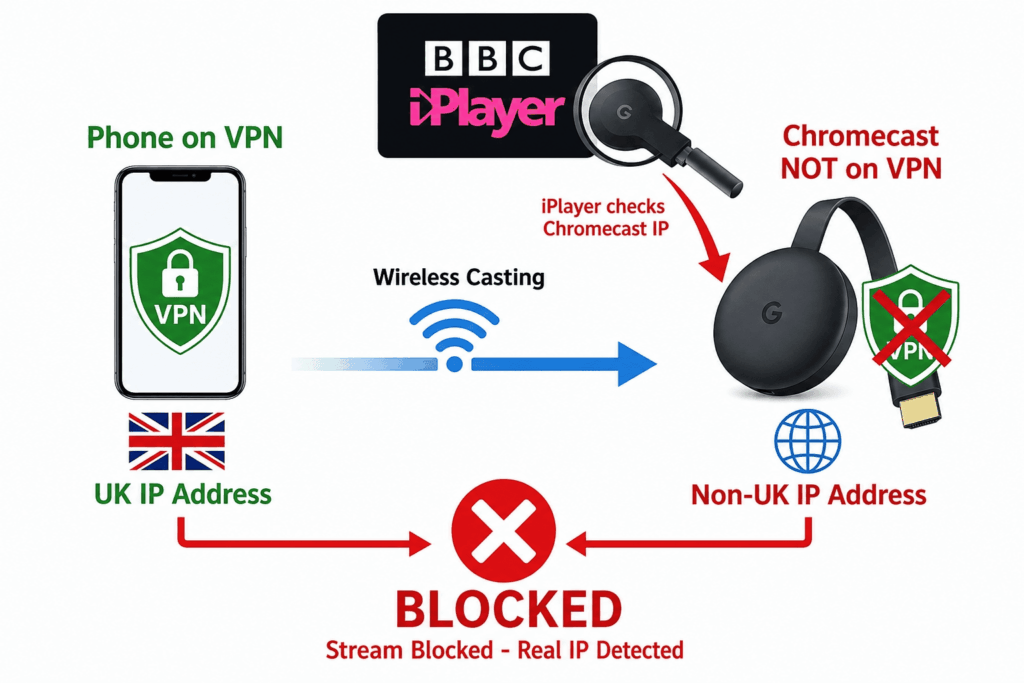
Chromecast trips people up because of a misunderstanding about how casting works.
Here’s the critical part: both the casting device and the Chromecast have to be on the same VPN network. When you cast from a phone that’s on a VPN to a Chromecast that is not, iPlayer reads the Chromecast’s real, non-UK IP, not your phone’s, and blocks the stream. Your phone being protected does nothing for the device actually pulling the video.
The clean solution is a router-level VPN, so the Chromecast itself appears to be in the UK. Chromecast with Google TV runs Android and can technically install a VPN app directly, but performance is often poor on that hardware, so the router route is usually better. The two-minute wait trick is frequently reported to work on Chromecast with Google TV as well.
Gaming Consoles (PS5, Xbox, Switch)
This one is short because the options are few. Consoles don’t support VPN apps, full stop, so only a router-level VPN works. There are no exceptions and no clever workaround on the console itself.
Smart DNS is the alternative, and it works, but it requires manually entering the DNS settings in the console’s network configuration. Once that’s done, the console routes its streaming DNS through the service without any encryption overhead.
Routers (DD-WRT, OpenWrt, Asus Merlin, Tomato)
For a household with a mix of devices, the router is the most flexible solution of all, and it keeps coming up above as the answer to Apple TV, smart TV, Chromecast, and console problems. One setup covers every device on the network at once.
The major providers (NordVPN, ExpressVPN, Surfshark, Proton) all support router configuration, and some routers ship with VPN client firmware built in. There’s a cost and a caveat. A VPN-capable router runs roughly $80–300, and some providers, ExpressVPN among them, sell pre-configured units so you skip the setup. The caveat is processing power: the router’s CPU has to be strong enough to handle VPN encryption and your streaming bandwidth at the same time. An underpowered router will bottleneck your video, turning a fix into a new problem. If you’re buying for this purpose, prioritize a model with a capable processor over a cheap one.
Creating a BBC iPlayer Account From Outside the UK
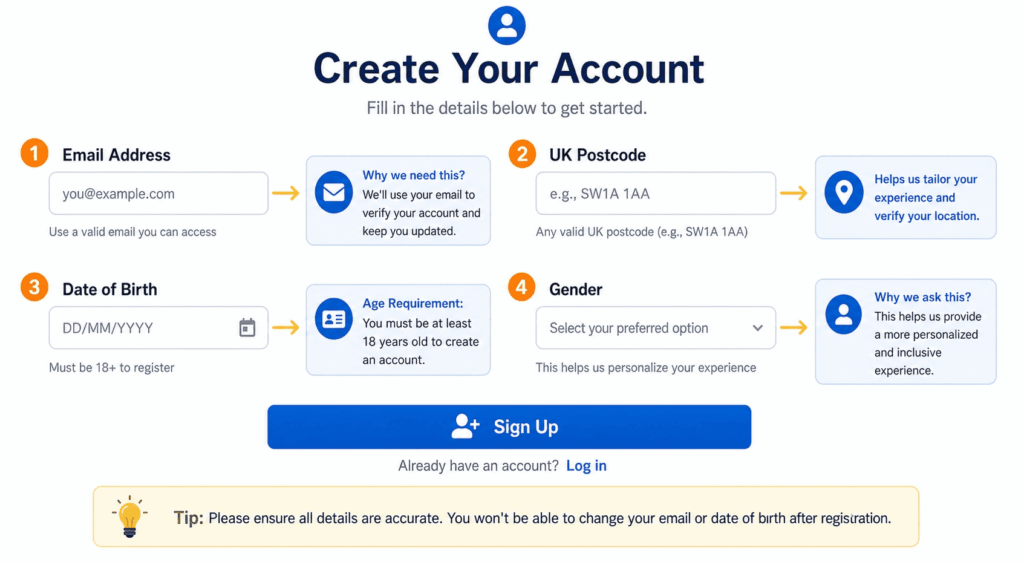
Plenty of readers aren’t troubleshooting a broken setup at all. They’re trying to watch iPlayer for the first time from abroad and have hit the sign-up wall. The good news is that BBC’s account creation is far less strict than its IP detection. There’s no residency check, no phone verification, and no TV License lookup. You just need to know what to enter.
What Information You Actually Need
iPlayer asks for an email, a UK postcode, a date of birth, and a gender. Only one of these requires any thought.
Your email can be any valid address, whether Gmail, Outlook, or anything else. Your date of birth must put you at 16 or older, which is what unlocks full content access; an under-16 birthdate restricts what you can watch. Gender is a required field, but any selection is accepted.
The UK postcode is the one people overthink. BBC does not verify it against your actual location, so any validly formatted UK postcode works. Commonly cited examples include SW1A 1AA (Buckingham Palace) and W1A 1AA (BBC Broadcasting House); any real London postcode will do. The format rule is one or two letters, one or two digits, an optional letter, then a space, a digit, and two letters.
The TV License Question — How to Answer
At your first playback, iPlayer asks whether you have a TV License. You click “Yes, I have a TV License,” and that’s the end of it. BBC performs no verification at this step. It’s a self-declaration, documented as such across every source on the subject.
Alternatives When Standard VPN Keeps Failing
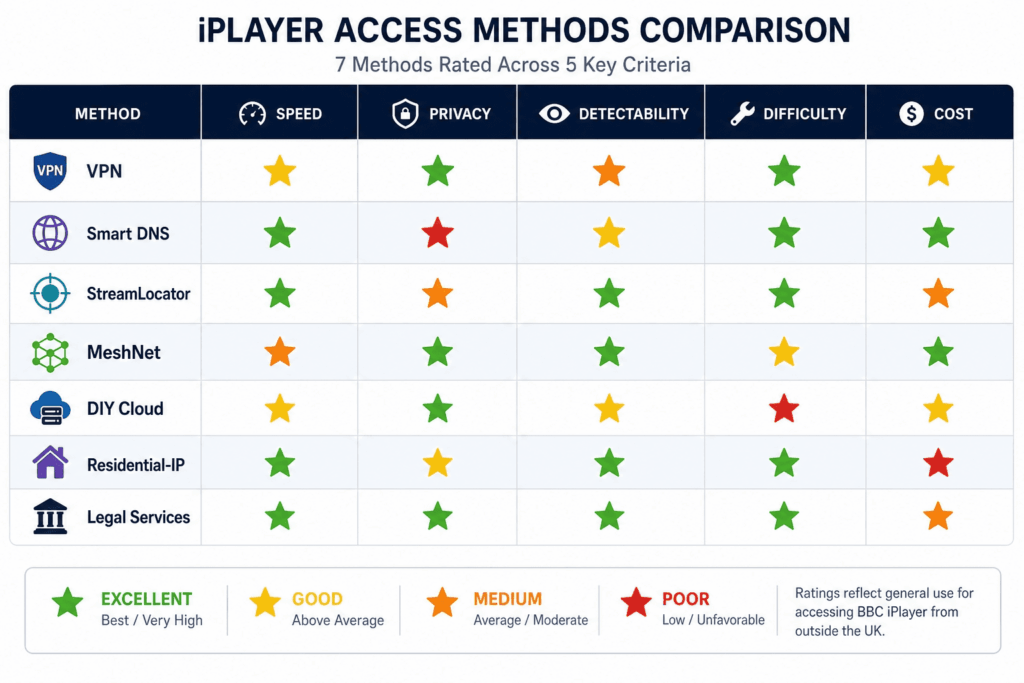
For a lot of people, a standard VPN is no longer the best tool for the job; it’s the one fighting hardest against BBC’s blacklists. The options below range from “faster and harder to detect than a VPN” to “legal, official, and no VPN required.” If you’ve worked the entire checklist and still can’t get a stable stream, the answer probably lives here.
Smart DNS Services
Smart DNS is the most underrated option in this whole guide. It works differently from a VPN: instead of encrypting your traffic and masking your IP, it only redirects the DNS lookups for streaming sites so they resolve as if you were in the UK. Nothing is encrypted, your real IP is unchanged, and there’s no privacy benefit at all.
That sounds like a downside, and for privacy it is. For streaming, it’s often an advantage. With no tunnel to fingerprint and no datacenter IP to blacklist, Smart DNS gives BBC far less to detect, and without encryption overhead it’s faster than a VPN. The trade-off is simple and honest: you gain speed and stealth, you lose privacy.
The functional options break down into a few categories. SmartDNSProxy is a dedicated streaming Smart DNS that works globally. ExpressVPN’s MediaStreamer comes included with its subscription and suits Apple TV, consoles, and smart TVs especially well. NordVPN’s SmartDNS is also included, though its reliability has wobbled; it was broken from December 2024 into January 2025 before being fixed. Unlocator is an older name that still surfaces in user threads as occasionally working. If you don’t need the encryption a VPN provides, Smart DNS deserves to be your first try, not your last resort.
StreamLocator and Hybrid Solutions
StreamLocator sits between Smart DNS and a proxy, combining the two and tuning the result specifically for streaming services. It’s compatible with Android TV, Fire TV, Chromecast with Google TV, and smart TVs, which are the exact devices that give standard VPNs the most trouble.
It also shows up repeatedly as the place frustrated users land after giving up on a VPN over persistent error 02050. One Reddit user, Bredius88, summed up the migration bluntly: “Subscribed to Streamlocator since 25 January, not a single error! My NordVPN will NOT be renewed.” There’s a 7-day free trial, which makes it low-risk to test against your own setup before committing.
Residential IP Approaches (Advanced)
Everything BBC’s blacklist does is aimed at datacenter IPs. The way around that is to use an IP that belongs to a real home, and there are a few routes to one.
The most accessible is NordVPN’s MeshNet, a free feature that routes your traffic through a trusted device on another network. If you have family or a friend in the UK with a NordVPN account, you can route through their home broadband and appear as a genuine residential UK user. Because it isn’t a commercial VPN IP, it’s essentially undetectable by the blacklist approach, and it’s the most reliable bypass available when you can set it up.
For technical users, Tailscale with a UK exit node achieves something similar through a DIY mesh network. There are also commercial residential proxy services, but they’re expensive, running roughly $50–200 a month, and built for web scraping rather than streaming, so they’re rarely the right fit here.
DIY VPN on a UK Cloud Server
If you’re comfortable on a command line, you can sidestep the commercial blacklists entirely by renting a UK cloud server and running your own VPN on it. The catch the blacklists haven’t fully closed is that major cloud providers aren’t blocked as aggressively as VPN datacenters. One Reddit user confirmed that StrongSwan IKEv2 on an AWS EC2 instance in London works for exactly this reason.
The cost runs about $30–50 a month for a dedicated cloud server, and the requirements are real: Linux administration, VPN configuration (StrongSwan IKEv2, WireGuard, or OpenVPN), and firewall setup. There’s also a privacy trade-off worth stating plainly. Instead of trusting a VPN company with your traffic, you’re trusting your VPS provider, who can see it just the same. This is a capable option for the right person and a poor one for everybody else, and it’s an overview here, not a setup tutorial.
Specialized Streaming VPNs (Residential IP-Based)
A small category of services positions itself around residential UK IPs aimed specifically at UK streaming sites. Beebs and BritVPN are the names that come up. The theoretical appeal is the same as the MeshNet approach: residential IPs are nearly undetectable as VPN traffic, because they look like ordinary homes.
The honest caveat is that independent verification of these services is limited. Their owners participate in Reddit threads, and there are free trials (Beebs offers a 3-day trial, for instance), so you can test the claims yourself. But treat this as an emerging category to be aware of rather than an endorsement, and use the free trial as your verification step rather than taking the residential-IP promise at face value.
Browser-Based and Download Approaches
A few approaches in this space sit in a legal and security gray area, and I’m flagging them as exactly that. The Kodi BBC iPlayer plugin fetches streams directly and can sometimes sidestep BBC’s user-facing geo-check; command-line tools like yt-dlp and youtube-dl can pull iPlayer content directly as well. Both occupy a gray zone around BBC’s terms, and in the case of unofficial add-ons they carry security risks of their own. They exist, you may encounter them mentioned elsewhere, and that’s as far as this guide goes with them. No setup steps.
There’s a clean alternative that does the same job legally: official iPlayer downloads. If you’re physically in the UK before you travel, you can download programs in the iPlayer app and they remain playable for up to 30 days, even with no connection and no VPN at viewing time. For anyone making regular trips abroad, downloading a stack of shows before you leave is the simplest, fully sanctioned way to watch on the road.
Legal Alternatives — BritBox, Acorn TV, BBC America
If you’d rather skip the cat-and-mouse entirely, several official services carry BBC content abroad. They don’t replicate everything iPlayer has, but they’re legitimate, paid, and never blocked.
BritBox is the big one, a BBC, ITV, and Channel 4 joint service available in the US, Canada, Australia, the Nordics, and South Africa for around $8.99 a month. Acorn TV offers British content internationally for roughly $6.99 a month. PBS Masterpiece carries selected BBC programming for US viewers at about $5.99 a month. For US viewers in particular, pairing BritBox with BBC America covers most of the gaps, since BBC America picks up much of what BritBox doesn’t. None of these is a perfect iPlayer substitute, but together they cover the bulk of what most overseas viewers actually want to watch.
BBC Services That Work Abroad Without VPN
Finally, not everything BBC offers is locked down, and a few services that work anywhere are easy to forget. BBC Sounds, the radio and podcast platform, is fully accessible outside the UK. The BBC News website works globally, as does the BBC Sport website. And BBC Three runs an official YouTube channel that’s free and unblocked on most content. If what you wanted from iPlayer was radio, news, or a specific BBC Three show, you may not need to fight the geo-block at all.
The Legal Reality — Three Separate Questions
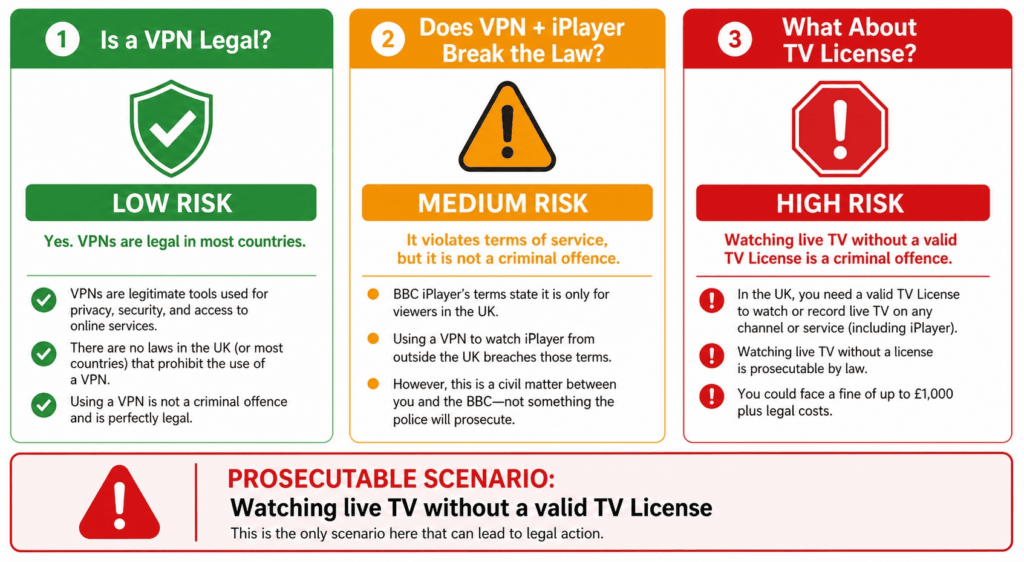
The legal confusion around iPlayer comes from blending three genuinely different questions into one. Separate them and the picture gets clear. None of what follows is legal advice, since laws and enforcement vary by where you live and you should check your own jurisdiction, but the three-question framework is the honest way to think about it.
Is Using a VPN Legal?
Yes, in virtually every jurisdiction a typical reader lives in, including the UK, the US, the EU, Canada, and Australia. Using a VPN for privacy and security is simply legal across the mainstream world.
The exceptions are a specific set of countries that regulate or restrict VPN use under very different legal regimes, including China, the UAE, Iran, Russia, Belarus, and North Korea among others. If you’re in one of those, the rules around VPNs are their own subject entirely. Everywhere most readers operate, owning and using a VPN is not in question.
Does Using a VPN With iPlayer Break the Law?
No, but it does breach BBC’s Terms of Service. The distinction matters: a Terms of Service breach is a contractual issue between you and BBC, not a criminal one. It belongs in the same category as violating a website’s terms, not the same category as breaking a law.
The worst BBC can do in response is suspend or revoke your iPlayer account. There’s no prosecution behind it. As Comparitech put it directly, “there is no precedent of UK residents being prosecuted for using a VPN to watch iPlayer while traveling abroad,” and as CyberInsider noted, “the worst thing that they can do is suspend your account.” BBC’s own energy goes into technical blocking, the six detection layers, rather than into pursuing the users behind a VPN.
What About the TV License?
This is the question with real teeth, and it’s separate from the other two. A TV License is legally required to watch iPlayer regardless of where in the world you are, per TV Licensing’s official policy. The maximum penalty for watching iPlayer without a license while in the UK is a £1,000 fine (£2,000 in Guernsey).
The critical nuance is who you are and where you are. Three scenarios.
A UK resident traveling abroad with a valid TV License is technically still covered by that license, so the VPN use is purely a Terms of Service matter, with no legal exposure.
A UK resident using a VPN specifically to dodge paying for a license is violating UK law, and that is the one genuinely prosecutable scenario in this whole discussion.
A non-UK resident sits outside the reach of TV Licensing’s enforcement, which has no mechanism abroad. There are no documented cases of overseas viewers being prosecuted.
BBC itself has acknowledged the gray zone, stating that “we are interested in being able to allow UK licence fee payers to access BBC iPlayer when they are abroad, there are complex technical issues to resolve which we are investigating.” The license enforcement that exists is built around UK addresses; outside the UK, it simply doesn’t operate.
The Honest Practical Summary
Strip away the legalese and it comes to this. For the overwhelming majority of people reading a guide like this, whether UK expats, travelers, overseas Brits, or foreign fans of BBC shows, the practical risk is account suspension, not a court date. The only scenario carrying real legal exposure is a UK resident using a VPN to avoid paying the TV License fee they owe.
That’s the line. Everything else in the legal conversation is a contractual matter dressed up as something scarier. As always, your own jurisdiction is what governs you, so if your situation is unusual, confirm it for yourself rather than relying on a general summary.
How BBC’s VPN Detection Has Evolved (And Why This Will Keep Happening)
Here’s something most guides on this topic don’t state outright: the problem is getting worse, not better. The reason your VPN worked last year and struggles now isn’t bad luck or a bad provider. BBC has spent more than a decade tightening its detection, and the direction of travel is clear. Understanding that arc tells you why old advice goes stale so fast, and why “currently working” is a claim with a short shelf life.
The Timeline of BBC’s Crackdown — 2013 to Today
The escalation has been steady, with a few sharp inflection points.
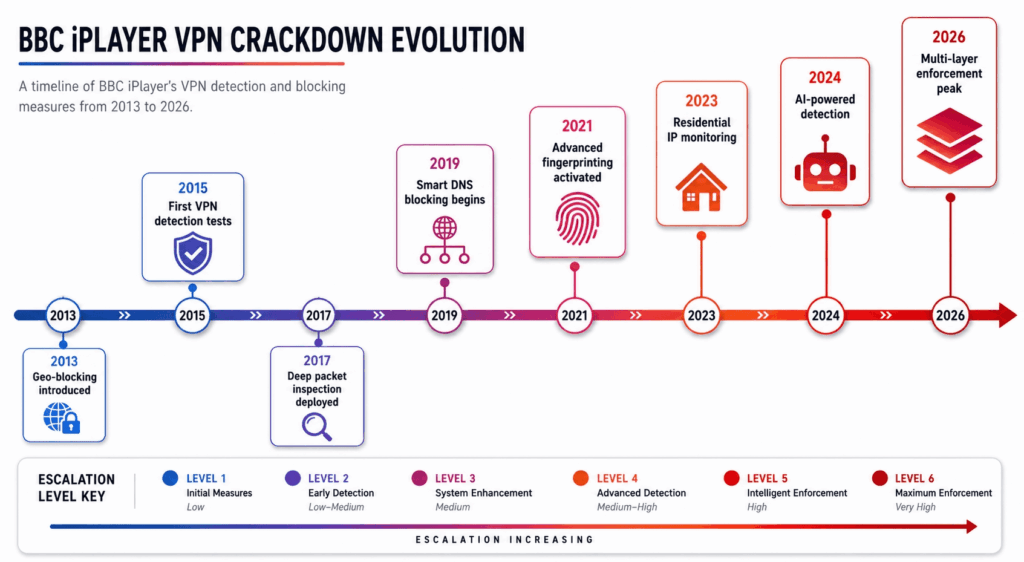
Back in 2013–2014, some VPN providers, AirVPN among them, briefly advertised iPlayer bypass as a feature. That didn’t last; BBC moved quickly enough that the providers stopped promising it. In 2016, iPlayer began requiring sign-in, where access had previously been open, the first step toward tying viewing to identifiable accounts.
The 2017–2018 period brought the first major crackdown wave, with BBC blocking the datacenter IP ranges of multiple VPN providers wholesale rather than one address at a time. In September 2020, ExpressVPN was reported broken for roughly six weeks straight, per the Survive France community, an early sign that even premium providers couldn’t assume stability. An April 2021 Hacker News post documented cookie-based session affinity as a detection method, which complicated the standard “just clear your cache” advice by showing that BBC remembered where you’d been.
Through 2022–2023 came what users called the major VPN purge, with a big expansion of behavioral detection and DNS analysis, the shift from “is this IP on a list” to “does this connection behave like a real household.” In September 2024, NordVPN officially confirmed technical issues on Firestick and TV devices specifically. That fed directly into the December 2024–February 2025 window, when error 02050 surged en masse, NordVPN’s SmartDNS broke, and users began migrating to StreamLocator in numbers.
The pace didn’t let up into 2025. By June 2025, some ProtonVPN users found every UK server broken, with DNS resolver detection identified as the primary cause. By July 2025, PIA was newly reported broken, and Surfshark and NordVPN were behaving intermittently. By early 2026, the assessment from CyberInsider was stark: most VPNs are blocked, and only a small handful still work reliably. As the publication put it, “Most VPNs are blocked by BBC iPlayer and will simply not work. Even some industry veterans are not working well with BBC iPlayer at this time.”
The Strategic Shift — Blacklist to Whitelist
The individual events matter less than the strategy underneath them, and that strategy has fundamentally changed.
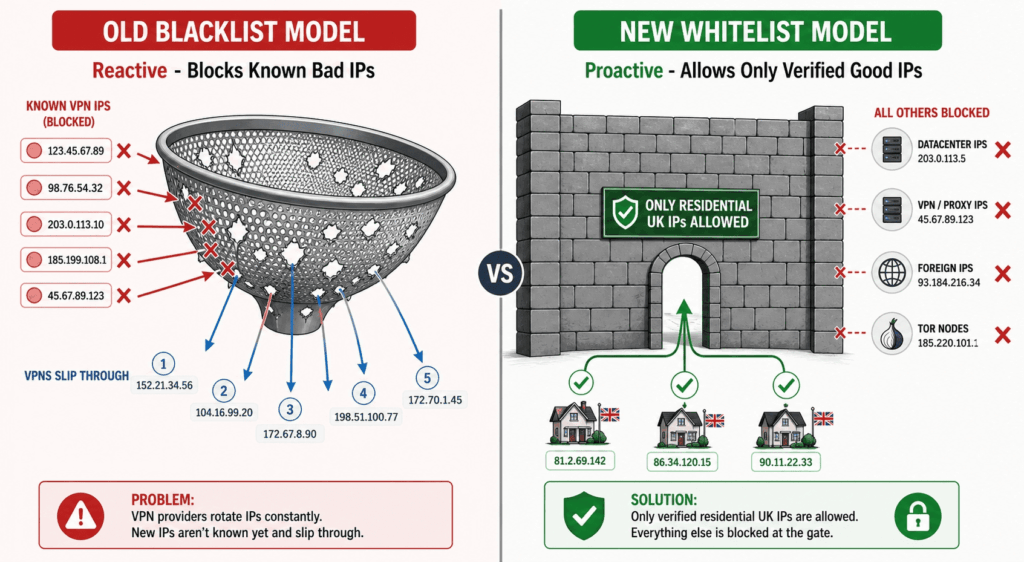
The old model was a blacklist: identify known VPN IPs and block them. It was reactive and leaky, since providers rotated IPs, BBC chased them, and there was always a window where a fresh IP worked. The emerging model inverts this. Instead of blocking what it knows to be a VPN, BBC increasingly wants to allow only IP addresses assigned to residential UK ISPs. AirVPN’s support team described exactly this: “BBC is progressively restricting access to their services only to IP addresses which have been assigned to residential UK ISPs.”
That inversion changes everything for a commercial VPN. Under a blacklist, the game is rotating faster than BBC can block, which is winnable, at least intermittently. Under a whitelist of residential addresses, a datacenter IP isn’t merely unblocked-until-caught; it’s the wrong kind of address by definition. No amount of rotation produces a residential IP from a server farm. This is why the residential-routing approaches (MeshNet through a UK home, your own UK cloud server, residential-IP services) keep rising in these discussions. They’re the only approaches aligned with where BBC is heading.
What This Means for Future Reliability
The practical conclusion is one most commercial guides won’t say, because it undercuts the sale: any VPN working for iPlayer today may not work in six months, and that’s the normal state of affairs rather than a malfunction.
Plan around it rather than against it. Choose a provider with a genuine money-back guarantee so testing carries no real cost. Expect intermittent failures, and treat the troubleshooting checklist above as something you’ll return to rather than a one-time fix. And keep a fallback or two in reserve, whether a Smart DNS service, a router-level setup, or a residential-routing option, so that when your primary method stops working, you’re switching tools rather than starting from zero. The viewers who stay frustrated are the ones expecting a permanent solution. The ones who stay watching treat it as an ongoing, manageable arms race.
Frequently Asked Questions
Why is BBC iPlayer not working even with a VPN?
How does iPlayer know I’m using a VPN?
Does BBC iPlayer track your IP address?
Why does BBC iPlayer think I’m outside the UK even when my VPN is connected?
How do I stop BBC iPlayer from blocking my VPN?
How do I unblock BBC iPlayer when my VPN is blocked?
How do I bypass the BBC iPlayer region lock?
How do I change my IP address to watch BBC iPlayer?
Can I get BBC iPlayer in the USA?
How can I watch BBC iPlayer outside the UK for free?
Is it legal to watch BBC iPlayer with a VPN?
Can BBC detect you watching iPlayer without a TV Licence?
Why does iPlayer sometimes work and sometimes not with the same server?
When to Give Up on Your Current VPN
You’ve cleared cookies, swapped servers, fixed DNS, closed leaks, and tried the witchcraft. At some point, persistence stops being a virtue and starts being a wasted evening. This section is about recognizing that point, and what to do once you’ve reached it.
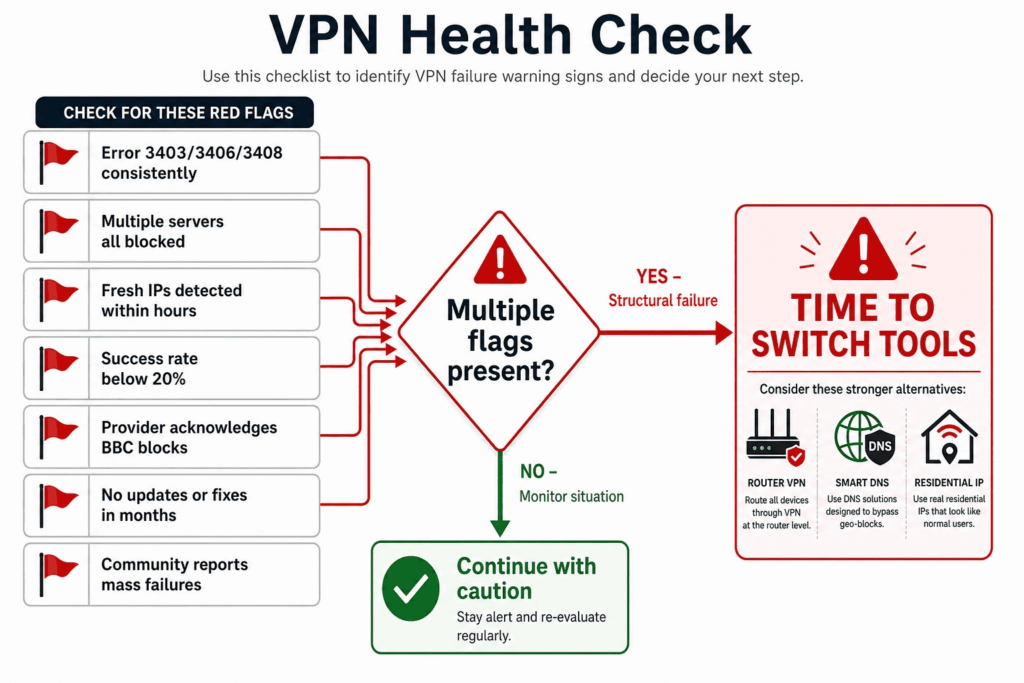
Signs Your Current VPN Won’t Recover
A few patterns tell you the problem is structural rather than something you can fix from your end. The clearest is persistent failure across all UK servers for weeks, not just one or two cities, which points to the provider’s IP ranges being broadly blacklisted rather than a single flagged address. An official statement from your VPN’s support team acknowledging the problem with no ETA is another, as NordVPN issued during the Firestick wave. So is the same failure hitting multiple devices at once, which rules out a device-specific quirk. And if a DNS leak test shows your VPN’s IPs sitting in datacenter ranges that BBC has clearly flagged, you’re looking at the wrong kind of address for where BBC is heading.
When several of these line up, no amount of additional troubleshooting will change the outcome. The tool itself has run out of road.
What to Look for in a Replacement
If you do switch, the criteria are straightforward and worth keeping neutral. Favor providers offering residential IPs or aggressive IP rotation, since those survive BBC’s blacklists longest. Look for dedicated UK servers spread across multiple cities, not just London, so you have alternatives when one location gets flagged. Insist on a money-back guarantee, which lets you test against iPlayer with no real risk. Weight recent reports from users in your country, because the same provider can work in one region and fail in another. And value a support team that’s responsive to streaming issues specifically, since they can point you to a working server in real time.
No single provider is the right answer for everyone, and the right answer this month may not be the right answer next month, which is exactly why the criteria matter more than any name.
Final Practical Advice
Treat iPlayer access as an ongoing situation rather than a problem you solve once. BBC’s detection keeps improving, the strategic shift toward residential-only whitelisting keeps narrowing the field, and what works today carries no guarantee for six months from now. That’s not a reason for pessimism. It’s just the reality of the arms race, and it’s entirely manageable once you stop expecting permanence.
Bookmark this guide and come back to it when something breaks again, because something eventually will. Lean on money-back guarantees so experimentation costs you nothing but time, keep a fallback method or two in reserve, and remember that the viewers who keep watching aren’t the ones who found a magic VPN. They’re the ones who learned to troubleshoot, adapt, and switch tools without frustration when the situation changes.



