If you want the best VPN for a Smart TV, the hard part is not finding a service with decent marketing copy. It is finding one that actually works on living-room hardware, handles major streaming services without constant errors, and gives you more than one setup path when your TV does not support native VPN apps. That matters more than ever because Smart TV platforms are fragmented: Android TV and Google TV are flexible, Fire TV is easy, Apple TV is much better than it used to be, and Samsung and LG still push many users toward a router or Smart DNS setup.
- Our Tested Smart TV VPN Picks
- Why Use a VPN for Smart TVs?
- How to Set Up a VPN on Your Smart TV
- Smart DNS vs. VPN for Smart TVs
- Factors to Consider When Choosing a Smart TV VPN
- Free VPNs vs. Paid VPNs for Smart TVs
- Troubleshooting and Common Issues with VPNs on Smart TVs
- Smart TV VPN FAQ
- Best Smart TV VPN: Final Take
We tested the providers in this guide with a simple question in mind: which service is easiest to live with on a TV, not just on a laptop? That meant looking at app quality, connection stability, speed, router options, Smart DNS support, and how reliably each provider handled popular content platforms such as Netflix and other region-locked streaming services. Privacy and security still matter, but a tv VPN also has to pass the couch test: open the app, pick a location, and start watching without fuss.
For most people, NordVPN is the strongest all-around pick, Surfshark is the best value for homes with lots of devices, and ExpressVPN stands out when native TV support is limited. We also weighed setup flexibility, from Apple TV apps to router installs, because the best VPNs for smart streaming are compatible with your TV model. In our view, the best Smart TV VPN is the one that fits both your hardware and your habits. If you want a friendly VPN that is easy to use, it should still have the security features and speed you need for streaming.
A good VPN service should also make it easy to sign up, choose a VPN protocol, and connect to VPN servers without reading a long manual. That is especially true when you want to access content on a larger screen and do not want to keep switching between apps. If you are comparing NordVPN and ExpressVPN, keep in mind that their strengths differ: one may deliver better download speed, while another may be easier to live with on a specific TV model.
Our Tested Smart TV VPN Picks

NordVPN
Why it made the list
- Fast apps, strong streaming access, broad TV support.
- Native apps for Android TV, Fire TV, and Apple TV
- SmartPlay feature handles region-locked content automatically

Surfshark
Why it made the list
- Unlimited simultaneous connections for busy households.
- Unlimited simultaneous device connections
- Native apps for Android TV and Fire TV

ExpressVPN
Why it made the list
- Smart DNS helps on TVs without native VPN support.
- MediaStreamer Smart DNS works on Samsung, LG, and other non-app TVs
- Native app for Apple TV
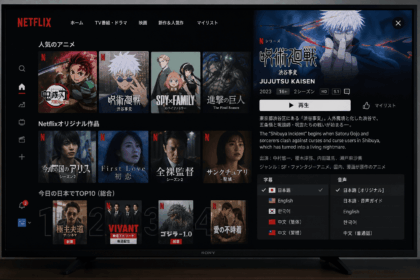
Netflix Japan is a distinct library for a reason, but for smart TV users the content gap is usually about region-locked sports, local drama, or a streaming service that has not launched yet in your country. The best VPNs close that gap across every device type, not just browsers and phones. They help you can access libraries from abroad, and they do it without turning setup into a chore.
In our tests, some providers had fast apps but no Smart DNS or Apple TV support, while others had great router guides but slow throughput. The ones that made this list work consistently across at least three setup paths, not just the easy ones. That matters because you can get a lot of flexibility from a single subscription only if the VPN provider offers enough ways to connect.



Why Use a VPN for Smart TVs?
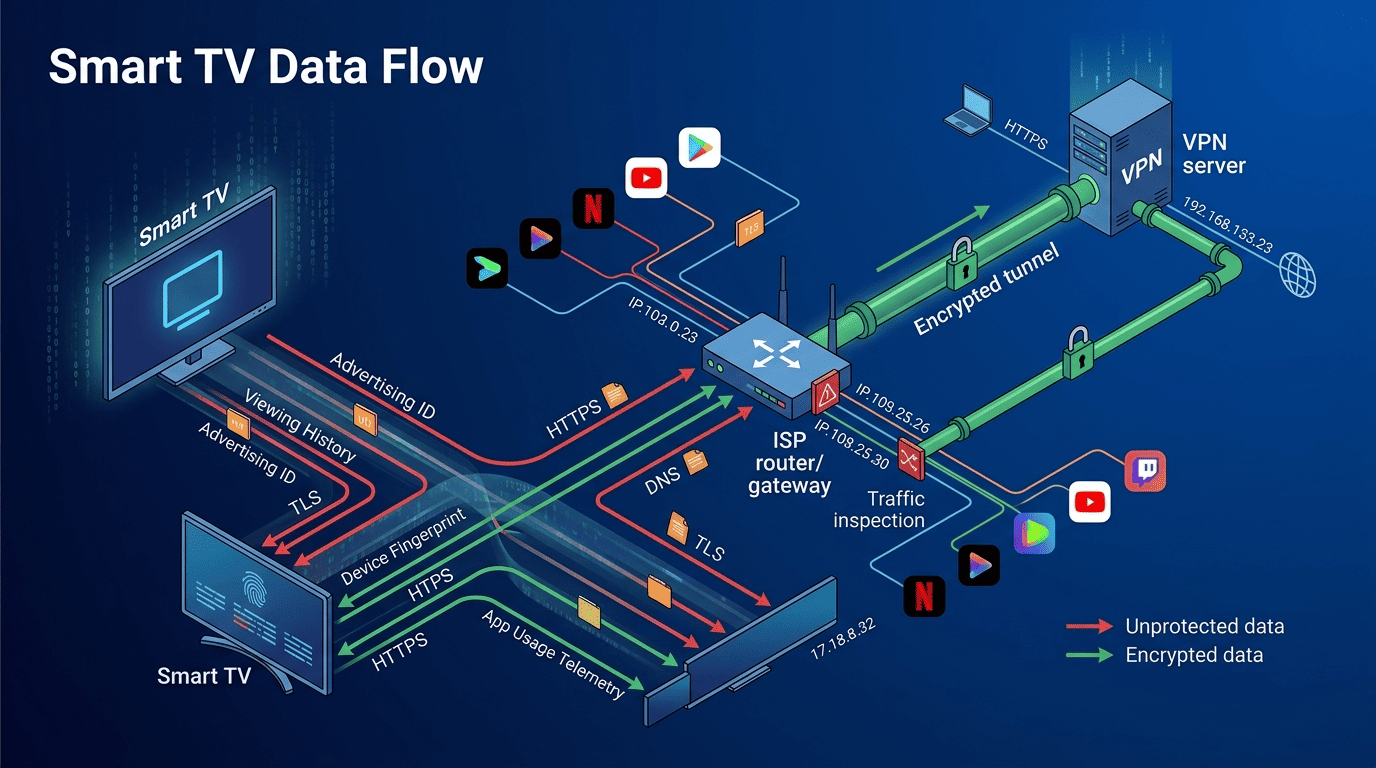
Smart TVs collect viewing data, assign advertising IDs, and share usage patterns with platform operators and third parties by default. They carry the same geo-restriction constraints as phones and computers, and they are just as affected by ISP throttling.
The most common reason people use a VPN on a Smart TV is streaming access. Regional libraries on Netflix, Disney+, and BBC iPlayer differ significantly depending on where your IP address appears to be. A VPN changes that location at the network level, letting you watch content that is unavailable in your region without changing your subscription or account. If you want to access content from another country, a reliable VPN service is often the simplest answer.
The second reason is privacy. Smart TVs collect a large amount of usage data by default — what you watch, when you watch it, and which services you use. Encrypting your traffic through a VPN prevents ISPs and third parties from building a behavioral profile from your viewing habits. This matters more as smart TV platforms shift to ad-supported models that depend on audience data. In that sense, good security and privacy controls are not optional extras; they are core reasons to use a VPN provider at all.
A third use case is ISP throttling. Some ISPs reduce speeds specifically for high-bandwidth streaming services. A VPN hides the nature of your traffic, which prevents bandwidth shaping from targeting video streams. This can result in faster, more stable playback during peak hours. It can also improve the download speed you see at busy times, especially if the provider has enough nearby VPN server options to avoid congestion. Many VPNs work this way, but the best ones do it with less slowdown.
How to Set Up a VPN on Your Smart TV
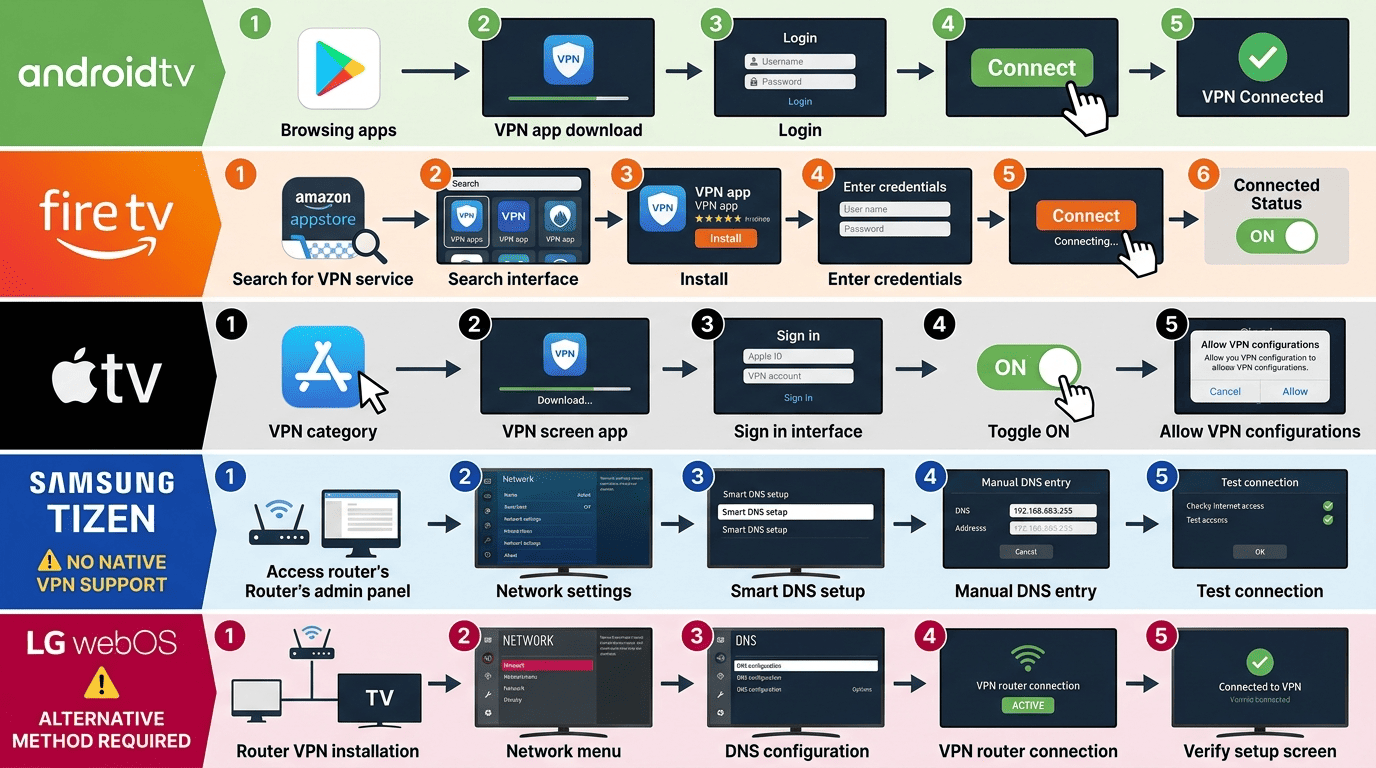
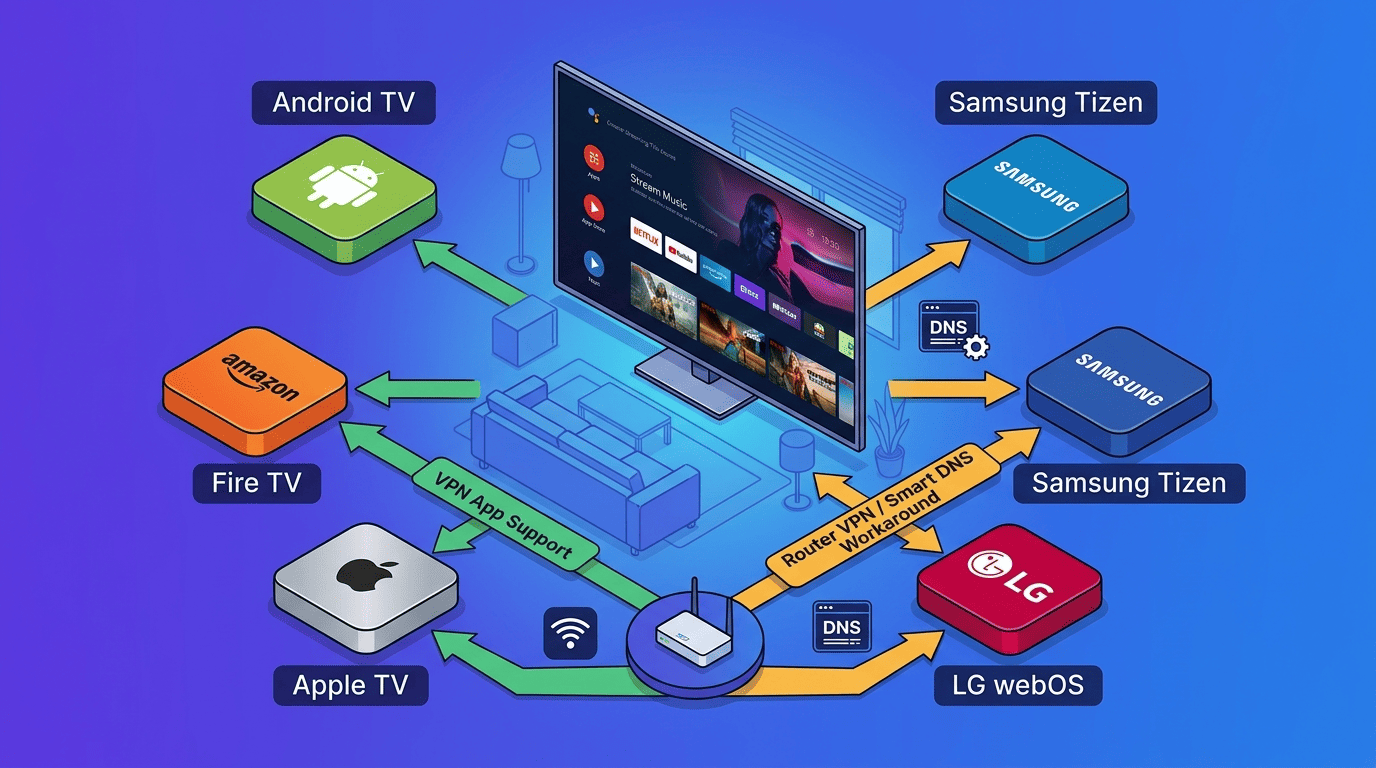
The most straightforward method depends on your TV platform. Android TV and Google TV users have the most options because these systems support VPN apps directly from the Play Store. Fire TV users can install most major VPN apps from the Amazon Appstore. Apple TV has gained native app support from several major providers since the tvOS app category expanded.
Samsung and LG TVs, which run proprietary operating systems, do not support direct VPN app installation. The practical options for these platforms are router-level setup, Smart DNS, or using a mobile hotspot as a go-between. Router setup protects every device on your network at once but requires more initial configuration. Smart DNS handles geo-unblocking without encryption. Mobile hotspot works as a quick workaround without buying new hardware.
For any platform, the general steps are: choose a provider with native support for your TV, sign up, download and install the app or follow the router guide, connect to a server in your target region, and verify the connection with a quick IP check. Most of the providers on this list include step-by-step guides for each major TV platform. If you are wondering how to set everything up with minimum hassle, start with a provider that offers clear onboarding and responsive customer support. That can make the whole process much easier to use.
If your TV supports it, try one of the best free VPN trials only as a short test, then move to a paid service if you want stable streaming. A free plan is rarely enough for living-room viewing, and it usually lacks the server locations you need. For Android and iOS companion apps, the setup is usually simpler because the same account can be used across devices. If you use a VPN router, make sure the VPN connection is active before you power on the TV, otherwise you may see the wrong region.
Smart DNS vs. VPN for Smart TVs
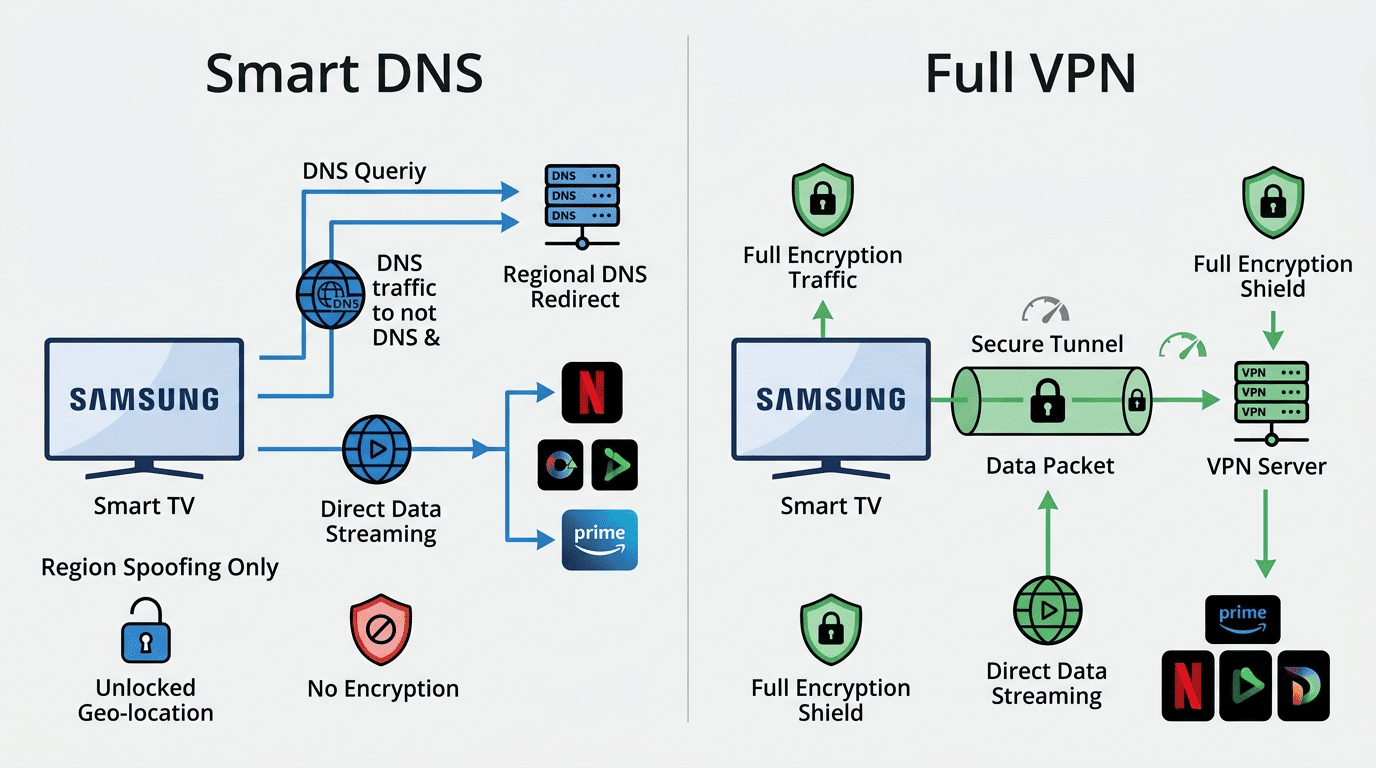
Smart DNS and VPN are often presented as alternatives, but they solve different problems. A VPN routes all of your traffic through an encrypted tunnel, which changes your apparent location and protects your data in transit. Smart DNS only redirects the specific traffic used for region detection, without encrypting anything.
For streaming on a TV that cannot install a VPN app, Smart DNS is often the most practical option. It works on Samsung, LG, and other platforms that lack app support, and it does not add the latency overhead of full encryption. The limitation is that Smart DNS provides no security or privacy benefit — it only changes where you appear to be, not how your traffic is handled. That is why the best Smart TV VPN providers usually bundle both options.
A VPN is the better choice when privacy, security, or ISP throttling bypass is part of the goal. For pure streaming on a locked-down platform, Smart DNS gets the job done. Many providers on this list offer both, which lets you use the right tool for each device on your network. If you can use a native app, you may prefer the full VPN service; if not, Smart DNS can be enough.
Factors to Consider When Choosing a Smart TV VPN
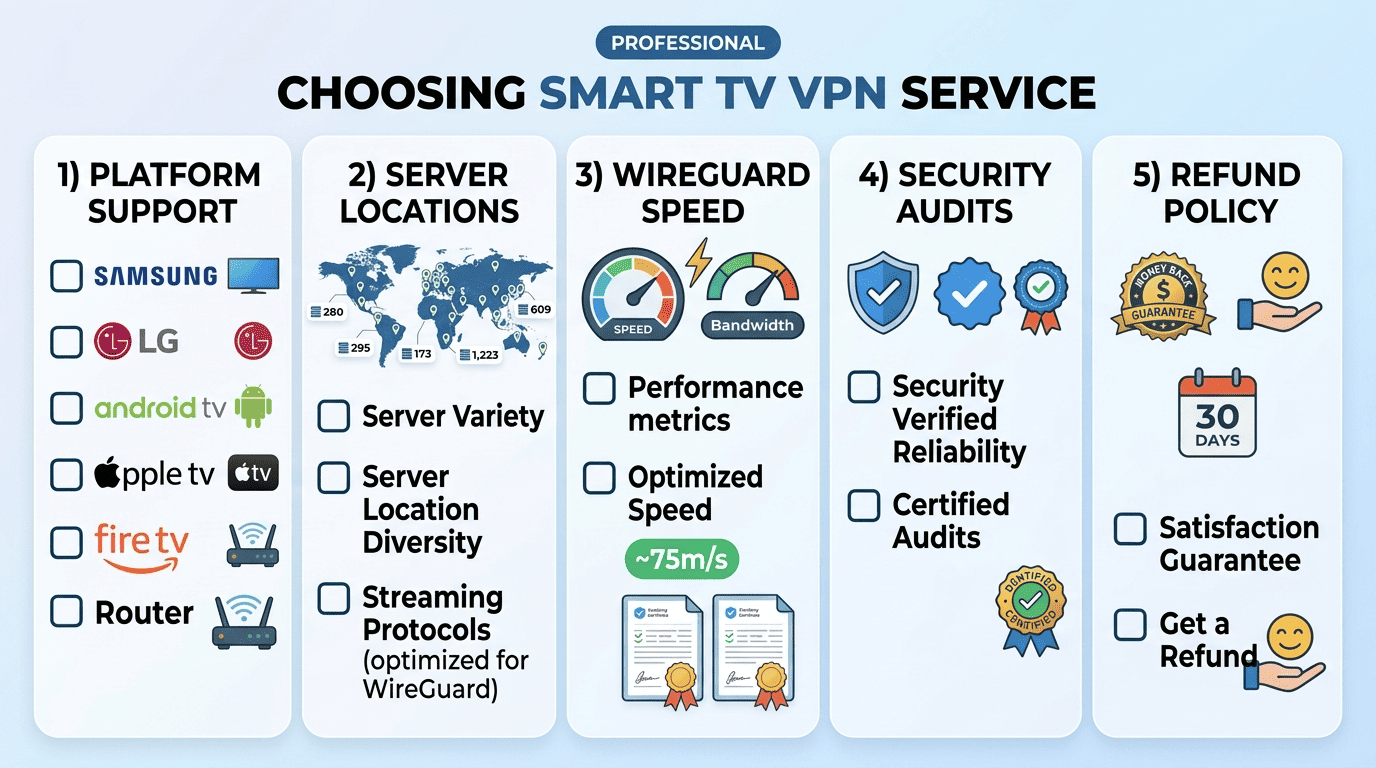
Device compatibility is the first filter. A VPN that lacks a native app for your TV platform forces you toward workarounds that add friction or require additional hardware. Check whether the provider has a dedicated app for your specific platform before committing. If you need a Smart TV VPN for a particular brand, make sure the app is actually available on that platform and not only on phones or desktops.
Server availability matters for content access. More servers in more regions means more consistent access to geo-restricted libraries. Providers with dedicated streaming servers typically maintain higher reliability because they update those servers more frequently when detection patterns change. A large VPN server network can also reduce congestion and improve your download speed during peak hours.
Speed is a practical concern for anyone watching in 4K. A VPN adds processing overhead and routes traffic through additional servers. Providers that support WireGuard or a comparable modern protocol keep that overhead low enough that 4K streaming remains stable on a typical home connection. That is where speed tests matter: they show whether a service can sustain real-world throughput, not just peak numbers. We also compare the speed of mbps across devices because the results can vary a lot between a phone and a smart TV.
Privacy policy and audit history separate real no-logs providers from marketing claims. Look for providers with independent audits, not just self-reported policies. Security and privacy should stay front and center, especially if your smart TV is one of many connected devices in the house. Also keep in mind that the VPN provider offers different levels of protection depending on the VPN protocol and router support you choose.
Price and refund policy determine the cost of testing. Most reputable providers offer a 30-day money back guarantee, and a few offer 45 days. If you are unsure whether a VPN will work with your specific setup, a longer guarantee gives you more time to verify before committing. Longer term plans and year plans can lower the bill, but only if the service fits your home. For many people, a long term plan is worth it only after they sign up and confirm that the apps are easy to use.
Free VPNs vs. Paid VPNs for Smart TVs
Free VPNs are available but rarely suitable for sustained smart TV streaming. Speed caps, data limits, and server restrictions make them impractical for video content that requires consistent bandwidth. Many free VPNs also lack Smart TV apps entirely, which limits installation options to router-level workarounds.
The more serious concern is privacy. Free VPNs sustain their infrastructure through data monetization, advertising, or both. For a device that already collects viewing data by default, adding a VPN that also monetizes traffic behavior eliminates the privacy benefit. This makes free options actively counterproductive for users whose primary concern is data protection. If you want a VPN service that protects both performance and privacy, paid is usually the better route.
Paid VPNs cover the mid-tier range from around $1.99 per month (Surfshark long-term plan) to roughly $3.09 per month (NordVPN two-year plan) and $6.67 per month (ExpressVPN annual plan). They provide the server infrastructure, maintained apps, and regular updates needed for reliable streaming. The money back guarantee period common across major providers means the cost of a first-time test is effectively zero if the service does not meet your expectations. That is one reason many users check out paid VPNs rather than relying on a free plan.
A limited exception exists: Proton VPN offers a free tier with no data cap and no logging, but it is speed-limited and excludes streaming servers. For privacy-conscious users who need basic protection but are not streaming region-locked content, it is the most credible free option. For active streaming use cases, a paid plan is the practical choice. If you want one of the best free VPN choices for limited use, Proton is the one to consider, but it is not ideal for Smart TV VPN streaming.
Troubleshooting and Common Issues with VPNs on Smart TVs
Proxy errors on streaming services usually mean the provider’s IP address has been detected and blocked. The most reliable fix is switching servers within the same region. If the problem persists, try a server labeled as streaming-optimized if your provider offers them. Some services like NordVPN automatically rotate streaming servers to avoid detection.
Slow speeds after connecting are often a protocol issue. Switching from OpenVPN to WireGuard or a similar lightweight protocol typically improves throughput significantly. If speeds remain low, connect to a server geographically closer to your physical location rather than one in the most distant available region. In some cases, a VPN router can improve stability because it reduces app-level glitches and keeps the connection active across all devices.
A VPN that connects but does not change the content library may indicate a Smart DNS or split tunneling configuration issue. Confirm that Smart DNS is enabled in your provider’s settings if you are using it on a non-app TV. For router setups, verify that your TV is routing traffic through the VPN rather than bypassing it. If you do not see the expected VPN connection, reboot the TV and the router, then sign up again if the account session has expired.
App crashes or installation failures on Fire TV or Android TV are usually resolved by clearing the app cache, reinstalling from the store, or updating the firmware. If a VPN app is not available in your regional Appstore, sideloading via ADB is an option on Android TV and Fire TV, though it adds complexity. Amazon fire devices sometimes behave differently from Android TV boxes, so it is worth testing both amazon fire tv and tv android tv instructions if you are unsure which guide matches your hardware.
Smart TV VPN FAQ
Does a VPN slow down Smart TV streaming?
Can I use a free VPN on my Smart TV?
What is the best VPN for Fire TV?
Do I need a VPN for Samsung or LG Smart TV?
How do I set up a VPN on Apple TV?
Is it legal to use a VPN on a Smart TV?
Best Smart TV VPN: Final Take
If your priority is simplicity, NordVPN is the best overall choice. If you want lower cost across many devices, Surfshark is hard to beat. If your television cannot install an app, ExpressVPN is often the most practical answer because its Smart DNS and router support fill the gap. For privacy-focused users, Proton VPN remains a strong alternative, especially when security and privacy matter more than convenience.
The right VPN service for smart TV use is the one that matches your hardware, your streaming habits, and your comfort level with setup. Before you sign up, think about whether you need native apps, Smart DNS, or a VPN router, and whether you care more about download speed or about the deepest privacy controls. If you want a long term plan, make sure the provider’s customer support and setup guides are good enough that you can actually use the service day to day.
In short, the best Smart TV VPN is not just about raw performance. It is about platform support, easy setup, and reliable access to the content you want, whether you are using amazon fire tv, tv android tv, or tv apple tv. Choose the one that fits your room, then check out the trial window and see how it handles your own internet connection.