


Finding the best VPNs for Netflix is harder than it looks because this is an ongoing arms race between VPN provider teams and Netflix blocking systems. A service can post strong speeds one month, then lose access to key libraries after a round of IP filtering. That is why we focus less on vendor claims and more on what matters in day-to-day use: can the VPN for Netflix connect quickly, load video without proxy errors, and keep enough speed for stable streaming across different devices?
- Best VPNs for Netflix
- How to Use a VPN with Netflix
- How to Choose the Right VPN for Netflix
- Troubleshooting VPN Issues with Netflix
- Why Netflix Blocks VPNs and Regional Restrictions
- Can You Use a Free VPN for Netflix?
- VPN Speed and Performance for Netflix Streaming
- Device Compatibility for Netflix VPNs
- How We Test and Review VPNs for Netflix
- Frequently Asked Questions
- Best VPNs for Netflix
Best VPNs for Netflix

NordVPN
Why it made the list
- Consistent Netflix access across major regional libraries
- NordLynx protocol delivers fast HD and 4K speeds
- Large server network with smart IP rotation

Surfshark
Why it made the list
- Unlimited simultaneous connections on one account
- Reliable Netflix library access at a low monthly price
- Clean apps with easy setup across all devices

ExpressVPN
Why it made the list
- Polished apps with reliable speed on travel networks
- Lightway protocol keeps streaming stable on weak connections
- Broad server coverage across major Netflix regions
For most readers, the shortlist is clear. NordVPN remains the best all-around pick, Surfshark is the value option that makes sense for bigger households, and ExpressVPN still earns its premium status for reliability and polished apps. Proton VPN also deserves a place in the conversation, especially for readers who care as much about privacy and security as they do about content access. Not every Netflix VPN can do all of this well. The ones below are the services we’d put at the top of a real comparison.
What matters most for a user is simple. A good VPN service should let the user sign up quickly, connect to a server in countries around the world, and keep internet access stable when Netflix changes its rules. The user should not have to guess which servers will work with Netflix or spend hours checking content libraries. That is the standard we use here.

If you want the short version, these are the best VPNs to start with. NordVPN is the best VPN for Netflix for most people because it balances speed, consistency, privacy, and broad server coverage without asking you to micromanage settings. In practical terms, that means you can open the app, pick a server, and watch Netflix with fewer failed attempts than you’ll usually get from smaller VPNs for Netflix.
Surfshark comes next for value. It is often the easiest recommendation for families, roommates, or anyone with a pile of devices because one account covers unlimited connections. That matters more than it sounds. A Netflix VPN that works well on one laptop is less useful if it struggles once a household starts streaming on phones, tablets, and a smart TV at the same time.
ExpressVPN remains the premium pick. It usually stands out for app quality, fast setup, and reliable performance while traveling, especially if you need a service that is easy to use across different operating systems. Its server selection is broad enough for most major Netflix libraries, and its streaming stability is one of the reasons it still belongs near the top.
Proton VPN is the privacy-first alternative worth considering if NordVPN, Surfshark, or ExpressVPN do not fit your budget or priorities. It may not be the automatic first choice for every user, but it brings a strong privacy reputation, capable streaming features, and enough server locations to stay relevant in a comparison of the best VPNs for Netflix content access.
A quick decision guide helps. Pick NordVPN for the strongest mix of speed and access. Pick Surfshark if price and unlimited devices matter most. Pick ExpressVPN if you want polished apps and reliable travel streaming. Pick Proton VPN if privacy ranks near the top of your list. If you want the fastest VPN for a specific country, start with the provider that has the deepest network of servers there.


How to Use a VPN with Netflix

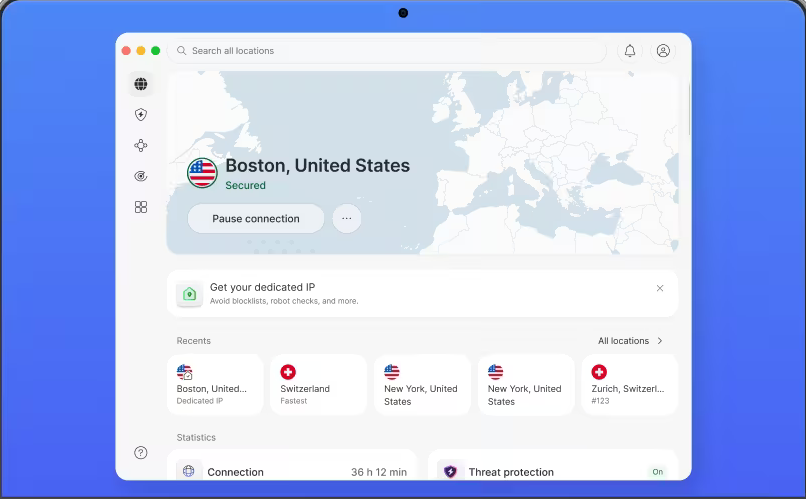
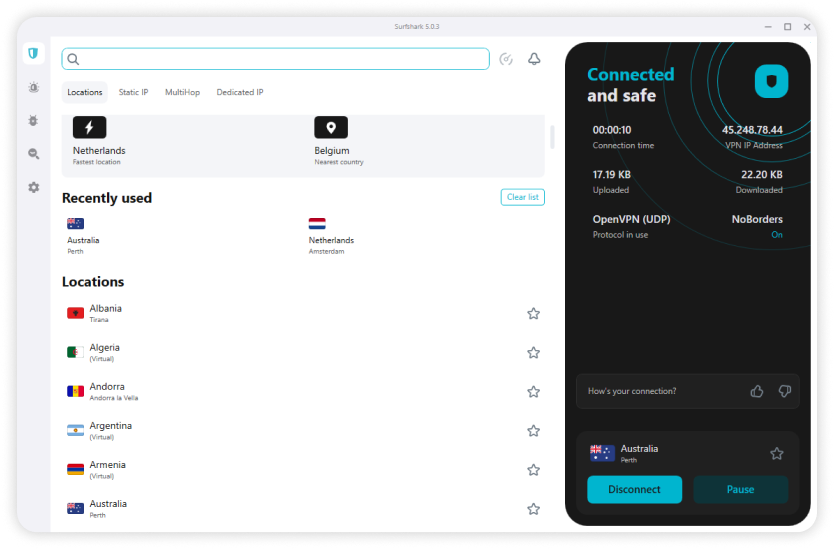
Using a VPN with Netflix is usually simple once you know the order of steps. The basic idea is to install the app, sign in, connect to a server in the country you want, and then open Netflix. That sounds obvious, but the sequence matters. If the connection is not active before Netflix loads, the service may keep showing the wrong library or trigger a Netflix VPN error. A good app should be easy to use, but even the best service works better when you follow a clean setup.
Step 1: Install and Sign In
Start by downloading the VPN app for the device you plan to use. Most major providers offer apps for Windows, macOS, iPhone, iPad, Android phones, and Android tablets, and many also support streaming hardware. Install the app from the provider’s official site or the device’s app store.
Once the app is installed, open it and sign in with your account details. This ties the device to your subscription and activates the service features you need for streaming. If your provider offers more than one protocol, the default option is usually the right place to begin. On many modern apps, that means WireGuard or a custom version of it, a protocol designed to keep speed high while lowering connection delay.
Before moving on, make sure the app shows that your subscription is active. A free tier or expired account may connect, but it may not provide the server access needed to watch Netflix reliably.
Step 2: Connect to a Netflix Server
Now choose the country whose Netflix library you want to access and connect to server options in that region. This is the step that changes your visible IP address. If the app offers streaming-optimized servers, start there. If not, use a standard location in the target country.
After you connect, give the app a few seconds to finish the handshake. A stable connection matters because Netflix checks network information quickly. If the first VPN server does not work, try another server in the same country rather than jumping randomly between regions. That usually gives you a better shot at access Netflix results without confusing the account session.
You can also confirm that the IP changed by checking a public IP tool in your browser. You do not need to do that every time, but it helps during setup. If the VPN still shows your home location, disconnect and reconnect before trying to stream Netflix. Netflix is much more likely to load the intended content once the region change is fully in place. When you need to access to Netflix titles from another library, the server choice matters a lot.
Step 3: Open Netflix and Start Watching
After the VPN connection is active, open Netflix in your browser or app and sign in as usual. If everything works, the available shows and movies should reflect the region tied to the server you selected. That is the moment you want to check the library, not just the homepage banner.
If the expected content does not appear, do not assume the service failed immediately. First, refresh the app or reload the browser tab. If that does not help, sign out and back in, or clear cookies and cached site data. Old location data can make Netflix cling to a previous session even after you connect.
If you still cannot access Netflix, switch to another server in the same country. That is often the quickest fix because one IP address may be blocked while another still works. Once the right server connects, you should be able to watch Netflix normally. Keep the VPN active for the entire session so the connection does not revert mid-stream. If you use a VPN to access a long list of titles, Netflix regions can shift depending on the app cache, so retrying is often worth it.
Using Netflix with VPN on Different Devices

The process is similar across most devices, but the details change a bit. On phones and computers, you usually install the VPN and Netflix apps directly, sign in, and connect before launching Netflix. That is the easiest setup.
On a smart TV or streaming box, the experience depends on platform support. Some devices have native VPN apps, while others do not. If your TV platform lacks app support, a router setup can help by sending all home traffic through the VPN connection. That takes longer to set up, but it can be useful for streaming on devices that do not support direct installation.
For travelers, laptops and phones are still the simplest option. They let you switch servers quickly, run tests if a location is blocked, and adjust settings without digging through TV menus. In many cases, these VPNs work best when the user keeps the app updated and checks customer support if a region fails.
How to Choose the Right VPN for Netflix

Picking a VPN for Netflix is less about marketing claims and more about avoiding weak services that fall apart under normal use. Plenty of providers advertise streaming support. Far fewer keep fast speeds, reliable library access, and decent privacy standards in the same package. The right choice usually comes down to four things: performance, server network depth, trust, and value over time.
Streaming Speed and Stability
Speed is the first filter because a VPN can technically connect to Netflix and still be miserable to use. For streaming, you want fast speeds that stay stable during peak evening hours, not just a single headline number from a vendor homepage. Buffering during a movie is not always the fault of your internet connection. It can also come from overloaded servers, poor routing, or a weak protocol.
That is why we pay attention to repeated tests rather than one-off results. A service that posts high speed once but fluctuates heavily is less useful than one that stays steady across repeated sessions. The best VPNs for Netflix maintain enough speed for HD and 4K playback without forcing constant reconnects.
In practical terms, stability matters as much as raw performance. You do not need the fastest service on earth. You need one that does not collapse once the network gets busy. A good VPN provider should also be able to access Netflix without making the user switch servers every five minutes.
Server Network and Netflix Libraries
A broad server network improves your odds of reaching more Netflix libraries because it gives you more server locations to choose from when one region is slow or blocked. That matters for two reasons. First, more countries mean more content options. Second, a deeper network gives the provider more room to rotate IPs and distribute users across multiple servers.
Library access is tied directly to infrastructure quality. A provider can list dozens of countries and still disappoint if only a handful of those servers work consistently with Netflix. What you want is not just a long map in the app, but a service that can actually connect you to the right region often enough to matter.
This is where bigger providers tend to pull away from weaker rivals. A larger server network usually means better odds of finding a working connection for the library you want, whether that is the US, UK, Japan, Canada, or other countries. If access to multiple catalogs is part of your goal, server locations deserve close attention. Strong streaming optimized servers can make the difference between loading content and hitting a dead end.
Privacy, Logs Policy, and Security
Even if your main reason for using a VPN for Netflix is streaming, privacy still matters. The service handles your traffic, your DNS requests, and often your account details. That means you should care about its logs policy, encryption standards, and general trust signals.
A no-logs or minimal-logs policy is a good starting point, though it should be treated as a claim to examine rather than a magic phrase. Look for a provider with a clear logs policy, a reasonable security track record, and apps that include the features users now expect, such as a kill switch. A kill switch automatically cuts internet traffic if the VPN drops, which helps prevent your real location from leaking mid-session.
You do not need every advanced privacy feature to stream Netflix. But you should avoid services with weak transparency, unclear ownership, or a history that makes their security promises hard to trust. Some top VPNs also publish a privacy policy that explains how their private internet tools work in plain language.
Price, Device Limits, and Money-Back Terms
Price matters, but only in context. The cheapest service is not a bargain if it cannot access Netflix on the devices you actually use. Compare the monthly cost, the long-term plan value, and the number of simultaneous connections included with the account. For many households, device support is as important as speed.
This is where Surfshark often stands out, while NordVPN and ExpressVPN justify a higher price with stronger overall performance. Proton VPN may appeal to readers who prioritize privacy and are willing to weigh that against cost. Your budget, your devices, and the number of people in your home all shape the value equation.
A money back guarantee is also useful because Netflix support changes. If a service offers a 30-day or longer refund window, use it as a real trial period. Test the regions you care about, test the apps on your main devices, and check how quickly support responds if something goes wrong. A generous back guarantee does not prove the service is good, but it does lower the risk of testing it yourself. In a year plan, that kind of protection can matter as much as any feature list.
Troubleshooting VPN Issues with Netflix

Even strong VPN services run into Netflix issues now and then. IP ranges get flagged, apps cache old location data, and overloaded servers can make a working setup feel broken. The good news is that most problems have simple fixes. The goal is to restore access Netflix without wasting an hour changing random settings.
When Netflix Says You’re Using a Proxy
The proxy error usually appears when Netflix sees a connection coming from an IP address associated with a known VPN range. In short, the platform thinks the server is part of a network used to block VPNs or at least identify them. That does not always mean your whole service is broken. Often it means that one server has been flagged.
The first fix is to disconnect and try another server in the same country. If your app supports multiple protocols, switch between them as well. Protocol choice can affect how traffic is handled, and sometimes a different connection method slips past a block that stopped the default one.
If the error persists, clear your browser cookies and cache or restart the Netflix app entirely. Netflix can store old session data that conflicts with your new region. Then reconnect and try again. If several servers fail, contact support and ask for a recommended location for Netflix. Good providers usually know which servers are performing better at the moment.
If Netflix Libraries Won’t Load
Sometimes Netflix opens, but the expected library never appears. This is often a region mismatch rather than a total failure. The simplest fix is to try a different server in the same country. One location may be too crowded, partially blocked, or routed poorly.
You should also confirm the selected region in the app before reopening Netflix. If you meant to access Netflix in the UK but accidentally connected elsewhere, the content catalog will reflect that. Close the app or browser completely, reconnect, and then relaunch Netflix from scratch.
If the library still does not change, sign out and back in. That resets the session and often forces Netflix to read the new location more accurately. If the content on Netflix still looks wrong, test another endpoint and compare again.
Slow speed and buffering fixes
If the video loads but keeps stalling, the problem is usually speed rather than blocking. Switch to a less crowded server first. A closer server often improves performance because your data travels a shorter route through the internet, which can lower delay and improve streaming stability.
Next, test your home connection. If possible, use wired Ethernet instead of Wi-Fi, or move closer to the router. Weak wireless signal can make a VPN seem slower than it is. You can also lower playback quality temporarily to keep the stream stable while you test different servers.
If your app offers multiple protocols, try another one. Some perform better on certain networks. A modern protocol such as WireGuard, designed for fast speeds, often works better for streaming than older options on the same connection. That is one reason a best free VPN rarely matches a paid VPN service when the connection gets busy.
Login, app, and device problems
Not every Netflix VPN problem is really about Netflix. Sometimes the issue is the app itself, an outdated device, or a login conflict. Start with the basics: update both the VPN and Netflix apps, then restart the device. Old app versions can create strange connection behavior that looks like a blocking problem.
Make sure your account still supports the device you are using and that the app has the permissions it needs. On mobile, that may mean confirming VPN permissions at the operating system level. On streaming devices, it may mean reinstalling only after easier fixes fail.
If the problem continues across several devices, test the VPN on a different network. That helps you tell the difference between a service issue and a local internet issue. It is a simple check, but often the most revealing one. In some cases, only available regions may differ because the provider has rotated the available servers.
Why Netflix Blocks VPNs and Regional Restrictions

Netflix does not block VPNs at random. The system exists because streaming rights are sold country by country, and the platform has to enforce those licensing boundaries. That is why a title available in one region can be missing in another, even for paying subscribers. Regional restrictions shape what content appears in different countries, and VPN detection is one way Netflix tries to control that access.
How Netflix Detects VPN Use
Netflix looks for patterns that suggest a connection is coming from a shared VPN endpoint rather than a normal home line. One common signal is a datacenter IP used by many users at once. If hundreds of people appear to stream from the same address, the traffic does not look natural.
Some servers get flagged faster than others because they are more visible, more heavily used, or easier to classify as commercial infrastructure. Once an address is blocked, access may fail until the provider rotates it out or routes users elsewhere.
That is why not every service works equally well. A VPN with more servers, better IP rotation, and smarter network management generally has a better chance to unblock Netflix than a smaller rival. It is a cat and mouse situation, and in practice it can become a cat and mouse game between Netflix and the VPN provider.
Why Netflix Catalogs Differ by Country
Netflix catalogs differ because licensing deals differ. Studios and distributors often sell rights by country or region, so the same movie or series can be available in one market and absent in another. This is not unique to Netflix; many streaming services work the same way.
For users, the result is simple but frustrating. The content tied to your subscription changes based on where Netflix thinks you are. That is why people traveling between countries often see different shows, different release windows, or missing titles that were available at home.
Regional restrictions are therefore less about your account tier and more about distribution agreements behind the scenes. A title can be only available in one market even when another market has the same subscription level.
What This Means for Users
For users, the main takeaway is to keep expectations realistic. No VPN can promise permanent access to every Netflix library in every country because the platform keeps updating detection methods. A server that works today can be blocked next week, and the opposite is also true.
That does not make VPNs useless. It means provider quality matters. The stronger services keep testing, rotating servers, and adapting faster when locations are blocked. That is why reliable options such as NordVPN, Surfshark, ExpressVPN, and Proton VPN stay ahead more often than bargain services with thin infrastructure.
If you want stable access, choose a provider with a history of strong streaming performance and treat Netflix support as something that needs ongoing maintenance, not a permanent checkbox. A year of steady performance matters more than one lucky session.
Can You Use a Free VPN for Netflix?

A free VPN can sound tempting for Netflix, especially if you only want occasional access. The problem is that free services usually fall behind where Netflix is toughest: server quality, available regions, and consistent speed. A free VPN for Netflix may connect once in a while, but relying on it long term is usually frustrating.
What Free VPNs Usually Get Wrong
Most free services have a small server network, fewer countries, and more crowded servers. That combination hurts streaming almost immediately. Users compete for limited bandwidth, speed drops at peak times, and the shared IPs are more likely to be identified and blocked.
Many also impose data caps, queue systems, or location restrictions that make it hard to finish even a short movie. A provider may advertise streaming access, but if Netflix sees the same public IP from thousands of free users, that access rarely lasts.
In short, a free VPN for Netflix usually fails on the exact things paid streaming users care about most. The user experience is rarely worth the compromise, especially when the same content libraries are easier to reach with a paid plan.
When a Free Plan Might Be Enough
There are a few limited cases where a free plan can help. If you only want to test app setup, verify whether a device supports VPN apps, or briefly check one region, a free option may be enough for that short experiment.
Some readers also use a free tier as a trial before moving to a paid plan. That can make sense, but only if expectations stay modest. It is not a dependable long-term answer for people who want regular HD or 4K streaming across multiple devices.
If your goal is consistent access Netflix performance, free plans are usually a stopgap rather than a real solution. A best free VPN can help you learn how to use VPN basics, but it rarely solves Netflix access for long.
Why Paid VPNs Usually Win
Paid services usually win because they invest more in speed tests, server rotation, and support staff. A larger server network improves your odds of finding a working location, and better infrastructure helps maintain streaming quality once you connect.
They also tend to offer more helpful apps, broader device support, and faster troubleshooting when a location stops working. That matters when you do not want to spend half the night hunting for one unblocked server.
A better way to try a service is to use a paid plan with a 30-day money back guarantee, or even a longer day money back window when available. That gives you a safer test than gambling on a free VPN with limited servers and unpredictable performance. If you compare plans per month and per year, the paid option is often stronger value.
VPN Speed and Performance for Netflix Streaming

VPN speed matters for Netflix because streaming is unforgiving once the connection starts to wobble. A service can have good privacy features and still feel poor in real use if it cannot hold a stable connection under normal internet conditions. For streaming, performance is the difference between pressing play and waiting for the buffer wheel.
Why Speed Matters for HD and 4K
HD and 4K video need steady throughput, not just short bursts of speed. If your VPN cuts too much bandwidth or adds too much delay, Netflix will either drop video quality or stop to buffer. That is especially noticeable on larger screens, where compressed video looks worse and interruptions are harder to ignore.
Slower services also create a compounding problem. The weaker your base internet connection, the less room you have for VPN overhead. Fast speeds matter because they preserve enough bandwidth for UHD playback even after encryption and rerouting add some cost.
If you want consistent 4K streaming, performance is not optional. It is the baseline.
How to Read VPN Speed Tests
Speed tests usually focus on three metrics: download speed, upload speed, and ping. For Netflix, download speed matters most because it affects how quickly the video data reaches your device. Ping, or latency, matters less for movies than for gaming, but it still influences how responsive a connection feels when loading content.
Run tests on both nearby and distant servers. A local result can show how efficient the VPN is under easier conditions, while a distant result gives a better picture of what happens when you try another country’s Netflix library. What you want is consistency across repeated tests, not one unusually fast result that never shows up again.
The best services maintain enough headroom for streaming even when the route is longer. That is why our tests include repeated loads and playback checks instead of only one benchmark.
Ways to Improve Streaming Performance
If performance drops, start with the obvious fix: choose a closer or less crowded server. That reduces network distance and can improve both speed and stability. If you are trying to access a library in a large country, test several locations within that region rather than assuming one server tells the whole story.
You can also switch protocols if the VPN supports it. WireGuard, a modern protocol designed for speed, often performs better for streaming than older options. Some providers also offer their own optimized servers, which can improve connection efficiency.
Finally, check your home setup. Restart the router, reduce other heavy internet use on the network, and prefer wired connections for streaming boxes if possible. The VPN is only one part of the chain.
Best Performance Features to Look For
The best performance features are not flashy. Look for modern protocols, stable server infrastructure, and tools such as split tunneling, which lets you send only selected apps through the VPN while the rest of your traffic uses the normal connection.
Smart routing features can also help by directing you to less crowded servers automatically. But the real priority is stable speeds, not marketing claims. A service that stays fast day after day is more useful than one that wins a single benchmark and stumbles in actual streaming. The fastest VPN is not always the best Netflix VPN, but it should still feel responsive.
Device Compatibility for Netflix VPNs

A Netflix VPN is only useful if it works on the screens you actually use. That sounds basic, but device support still separates top services from weaker ones. Good apps, broad platform coverage, and enough simultaneous connections matter as much as raw unblocking results for many households.
VPN Apps for Phones and Computers
Most leading providers offer apps for iOS, Android, Windows, and macOS, which covers the devices most readers use every day. The setup is usually simple: install the app, sign in, choose a country, and connect before opening Netflix.
The quality of those apps matters. A clean layout, fast connection button, and clear server list make the whole service easier to use. This is one reason ExpressVPN and NordVPN tend to score well, while Surfshark and Proton VPN also remain competitive. Their user friendly apps make it simpler to check out locations and move between streaming platforms.
Smart TV, Fire TV, and Streaming Devices
Big-screen streaming is where compatibility gets more complicated. Some providers offer native apps for Android TV, Apple TV, or Fire TV, while others rely on router setup or Smart DNS. Smart DNS reroutes location-related traffic without full encryption, which can help certain streaming devices access regional content when a full VPN app is unavailable.
For many users, Fire TV and Android TV are the easiest platforms because native apps are common there. A smart TV without app support may need a router-based setup instead. That takes longer, but it can extend access to devices that otherwise cannot run a VPN directly.
If streaming on a television is your priority, check platform support before you buy. You should also check out whether the VPN provider offers customer support for setup questions.
How Many Devices Can Connect at Once
Simultaneous connections tell you how many devices can use the service at the same time on one subscription. This is more important than it used to be because households stream everywhere now: one person on a laptop, another on a phone, kids on a tablet, and the living room TV still running in the background.
Surfshark stands out because it allows unlimited simultaneous connections. NordVPN, ExpressVPN, and Proton VPN use fixed device limits, which may still be enough for many users but require more planning in busy homes.
If you share an account with family or use lots of screens yourself, connection limits affect real value just as much as price. A service that fits your household is often the best choice, even if another posts slightly better benchmark results. If you want to see how the whole setup behaves year after year, that matters.
How We Test and Review VPNs for Netflix
We do not rank a Netflix VPN by homepage claims. We test VPNs directly on the devices and regions that matter for streaming, then compare the results over repeated sessions. This guide reflects how we test services for real-world access Netflix use rather than one-off demos.
Testing Netflix Access Across Regions
How we test starts with region checks. We test VPNs against multiple Netflix libraries, repeating sessions to see whether access holds up over time or only works once. A server that loads the right library on Monday but fails by Wednesday is less useful than a slightly slower one that stays reliable.
We also compare how often providers can unblock target regions without proxy errors and whether they require constant server switching. This part of how we test VPNs focuses on practical access, not theory. We also note whether the VPN service can work with Netflix on a phone, laptop, and tv box.
Measuring Speed, Stability, and Ease of Use
Our tests also look at speed, playback stability, and app quality. We measure how quickly a connection settles, whether streaming starts cleanly, and how often buffering interrupts normal viewing. Repeated tests matter more than one peak result.
Ease of use counts too. A good service should make it simple to pick a server, connect, and start watching across phones, laptops, and TV-focused devices without confusing menus. We also check whether the apps are like NordVPN in terms of structure or whether they feel bloated.
Judging Support, Pricing, and Refunds
Finally, we weigh support quality, plan structure, and refund terms. If a service loses Netflix access on one location, responsive support can save time by pointing users to a working server. We also compare price against device limits, apps, and overall streaming value.
Refund policy matters because Netflix access can change quickly. A money-back period gives readers time to test the service on their own devices and internet connection before committing long term. For some VPN users, that is the difference between a safe trial and a bad purchase.
Frequently Asked Questions
Is It Legal to Use a VPN with Netflix?
Which VPN Works Best for Netflix?
Can a Free VPN Actually Unblock Netflix?
Best VPNs for Netflix
If you are still deciding, the safest next step is to check out the providers that can access Netflix in the regions you care about and compare their content libraries, server counts, and support. The best VPN provider for one user is not always the best VPN provider for another, but the top VPNs usually share the same basics: fast servers, clear privacy policy language, and reliable internet access across devices.
For streaming platforms, the difference is often in the details. NordVPN is a strong choice when you want a VPN to stream without extra effort. Surfshark works well for households that need many devices. ExpressVPN is easy to trust if you value a premium feel. Proton VPN is worth a closer look if strict no logs claims matter to you and the private internet side of the service is important. Whichever VPN service you choose, look for streaming optimized servers, customer support that actually answers, and a day money back guarantee that lets you test it properly.