




If you want a UK IP address, the fastest route for most people is simple: install a VPN, connect to a server in the United Kingdom, and then verify that your new IP address shows a UK location. Within a few minutes, BBC iPlayer, ITVX, and other region-locked services start treating your device as if it is browsing from the UK.
This guide explains what a UK IP actually is, why people try to get one, and how to do it with a VPN, proxy, or Tor. For most users, the best option is a virtual private network because it combines speed, security, and easier access across apps, websites, and streaming services.
What is a UK IP Address?
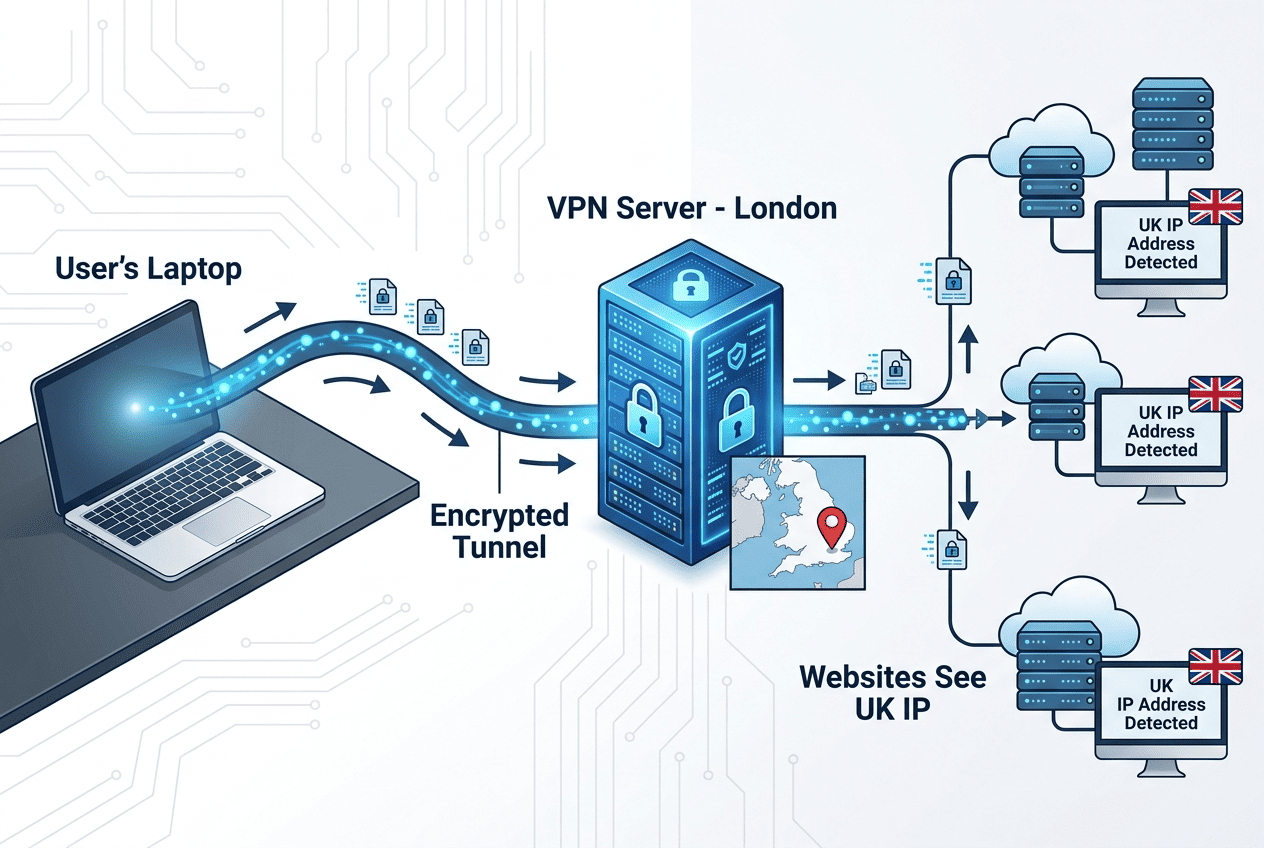
A UK IP address is an internet address assigned to a connection that appears to be in the United Kingdom. Websites, apps, and online services use that address as one of the main location signals to decide what content, prices, language settings, or access rules to show. If your visible IP address is British, many sites will treat your device as if it is browsing from the UK.
That does not mean your real physical location always changes in every system, but it does mean your connection looks British to most websites. This matters because region checks are often automatic, fast, and strict. Understanding that basic link between an address and location makes it easier to choose the right method.
IP address basics and location signals
An IP address is the public identifier your device uses to send and receive data over the internet. Think of it as the outward-facing address for your network traffic. When a site checks where you are, it often starts with that address. If the IP address belongs to a UK range, the site may classify it as a UK IP and deliver British content or services.
That is why people asking how can a website know their country usually get the same answer: your IP address carries location clues. Databases map address ranges to countries, cities, and internet providers. They are not perfect, but they are good enough for most regional controls.
Accessing UK-specific websites, viewing options, and account pages that may not appear from other countries is the direct practical benefit of holding a UK address. In many cases, the same principle also explains why a browser can show one region while a mobile app shows another, because each service can read different signals from your network connection and device settings.
What changes when your connection appears in the UK
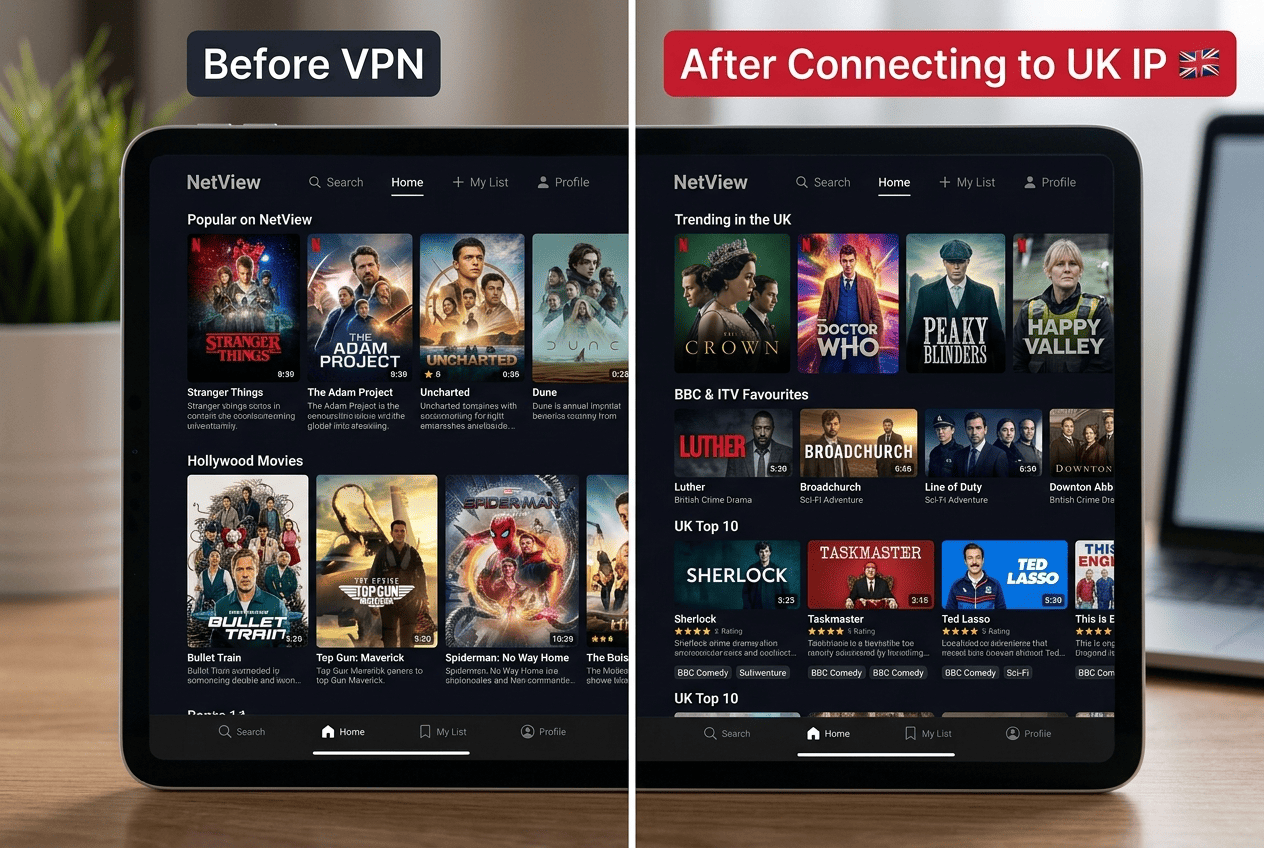
Once your connection appears in the UK, websites and apps may load a different version of the same service. You may see UK home pages, British search results, region-specific offers, and local media libraries. In practical terms, the main thing that changes is what your visible address tells a site about your location.
Login attempts, content catalogs, and support options can all shift once the address changes. Some services check whether your address matches expected countries before granting access, so if you are abroad and need a familiar regional setup, a UK IP address may help.
It is not a catch-all, though. Some sites also look at cookies, GPS, DNS requests, browser information, or account history — which is why the method you choose matters, especially if you care about privacy, speed, and a stable connection. It also explains why a simple address change may not be enough if your browser keeps old location data or if the service is watching more than one signal at once.
Why Get a UK IP Address?
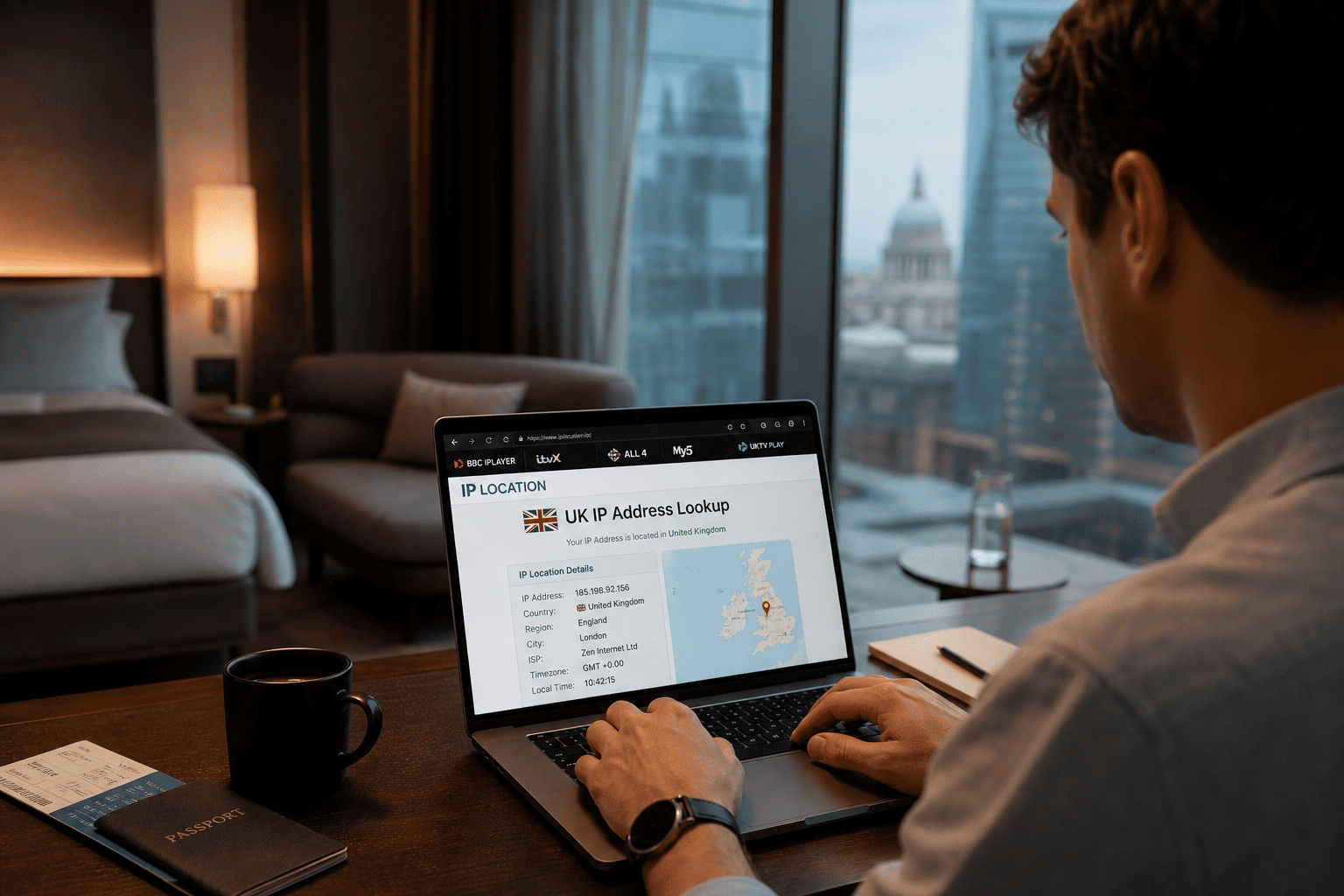
People usually try to get a UK IP for one of three reasons: access, privacy, or convenience while traveling. The use case shapes the right tool. If you only need to open a simple website, a proxy might do the job. If you want better privacy and smoother access across apps and streaming services, a VPN service is usually the better fit.
A second point matters just as much: not every method handles security, speed, and reliability in the same way. Some free VPN tools are slow, some UK servers are crowded, and some VPN providers are much better than others at keeping a stable internet connection. The right choice depends on what you want to do after your connection appears in the UK.
Access to UK streaming and websites
Getting into UK streaming platforms and local websites while outside the country is the most common reason to use a UK IP. Services such as BBC iPlayer, ITVX, Channel 4, and some sports or news sites often sort content by region. Without a British address, parts of the catalog may be missing or fully blocked.
A VPN service with dependable UK servers is usually the most practical tool here because streaming services tend to detect weaker workarounds. A proxy can sometimes load basic sites, but it often struggles with video traffic, apps, and account checks. If your goal is to access UK content consistently, stronger VPN providers generally offer better server locations, steadier speed, and fewer interruptions across devices.
That makes a difference for TV shows, live events, and on-demand libraries that are only meant for local viewers. When the catalog depends on the location you appear to be in, the right connection method can be the easy way to make the service behave as expected.
Privacy on public and home networks
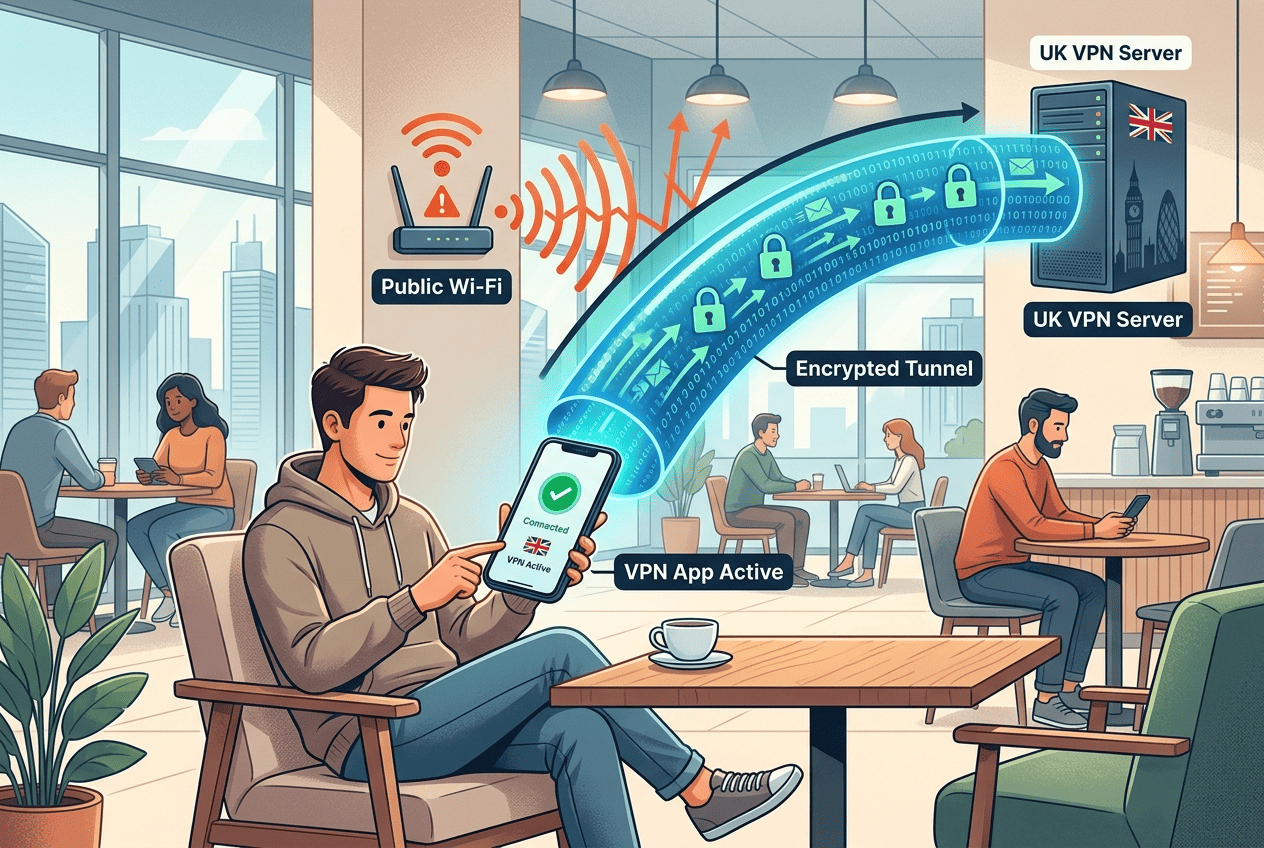
Online privacy is another driver, especially when connecting on public Wi-Fi or when you want to hide your real address during routine online activities. On an open network in a hotel, airport, or café, your raw internet connection exposes more information than many people realize. The sites you visit still see traffic coming from your visible address unless you route it through another service.
This is where a VPN helps more than a free VPN proxy. A virtual private network encrypts your traffic between your device and the VPN server, which improves privacy and security on public and home networks alike. It will not make every online activity invisible, but it does reduce how easily websites, local network operators, or nearby observers can tie activity to your real location. That is a practical upgrade for online privacy, not just a technical checkbox.
Third parties on the same network can sometimes infer patterns from unprotected traffic, which is another reason many people prefer a VPN over a simple proxy. If you care about personal data while browsing, paying bills, or checking messages, that added layer matters.
Travel, work, and account access
Frequent traveling abroad is another reason to get UK IP access. Banking portals, subscription services, or work platforms sometimes react defensively when a login appears from unfamiliar countries. Matching the region the service expects can make account access smoother when you are abroad.
That said, not every platform relies only on the address. Some also check browser fingerprints, device history, login behavior, or account policy rules. So while a UK IP can help, it does not guarantee access UK services will always work exactly as they do at home. It is also worth being careful with a free VPN for work or finance. Limited support, crowded servers, and weak privacy practices are not ideal around sensitive information. Paid VPN providers tend to offer better security, more stable internet connection quality, and more predictable performance for day-to-day services.
If you need to sign up for a service while overseas, or open online banking from a hotel network, the combination of a trustworthy VPN and a familiar location can make the process smoother. For users who must get an IP that looks local, reliability matters more than flashy extras.
How to Get a UK IP Address
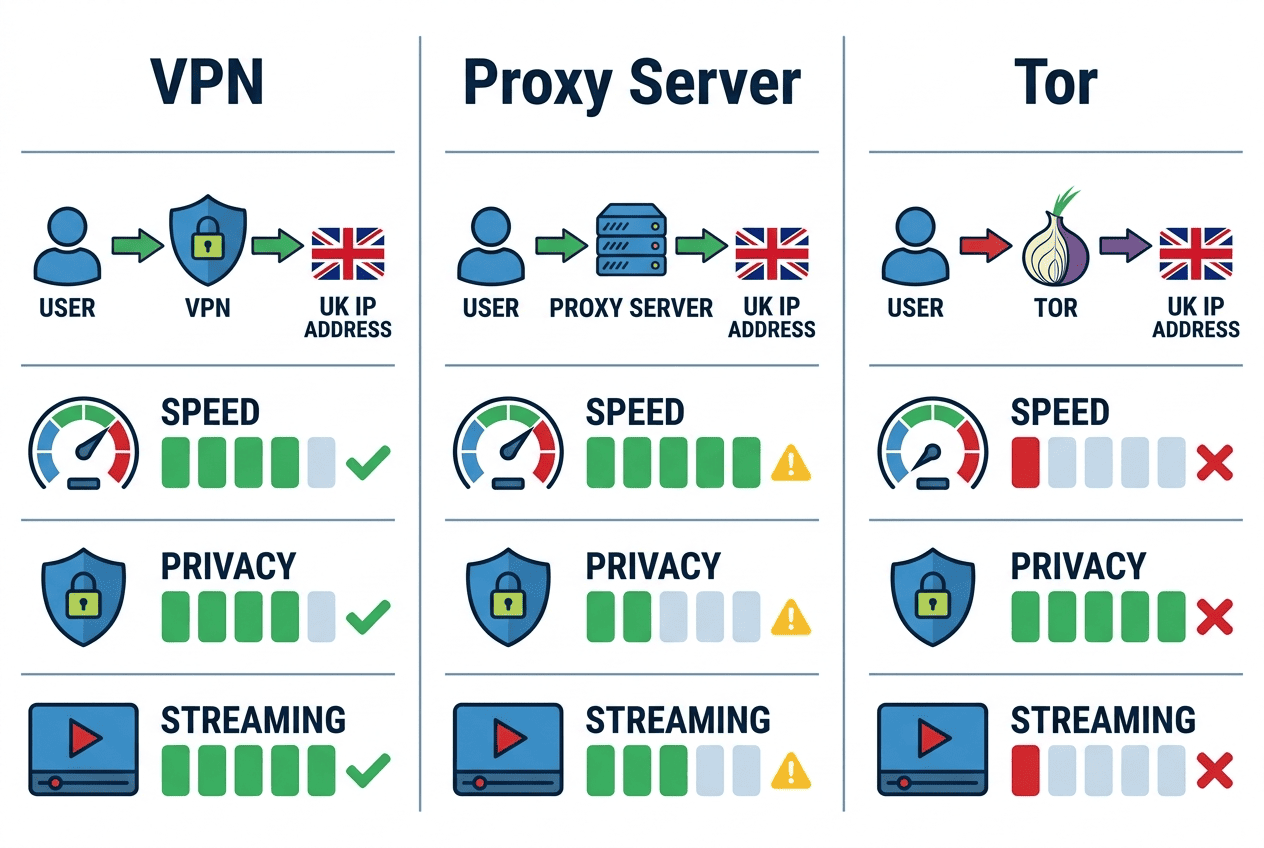
If your goal is to get UK IP access quickly, you have three main options: a VPN, a proxy server, or Tor. All three can change your visible location in some way, but they behave very differently once you start using websites, apps, and streaming services. The details matter. A method that works for a simple page load may fall apart under video traffic, account checks, or a crowded network.
For most readers, the question is not only how to get a UK IP address, but how to do it without sacrificing too much speed, privacy, or reliability. That is where the comparison gets clearer. A virtual private network usually offers the most even trade-off because it routes your traffic through remote servers in countries you choose, while also encrypting the connection between your device and the VPN server.
Before picking a method, decide what success looks like for you. If you just need to change your IP for a quick website check, a lightweight option may be fine. If you want to stream, sign in to sensitive services, or keep your data more private on public internet connection points, the stronger method is usually worth it. A good VPN can also be set up in just a few minutes, which is part of why it is the default choice for so many users.
Using a VPN to Get a UK IP Address
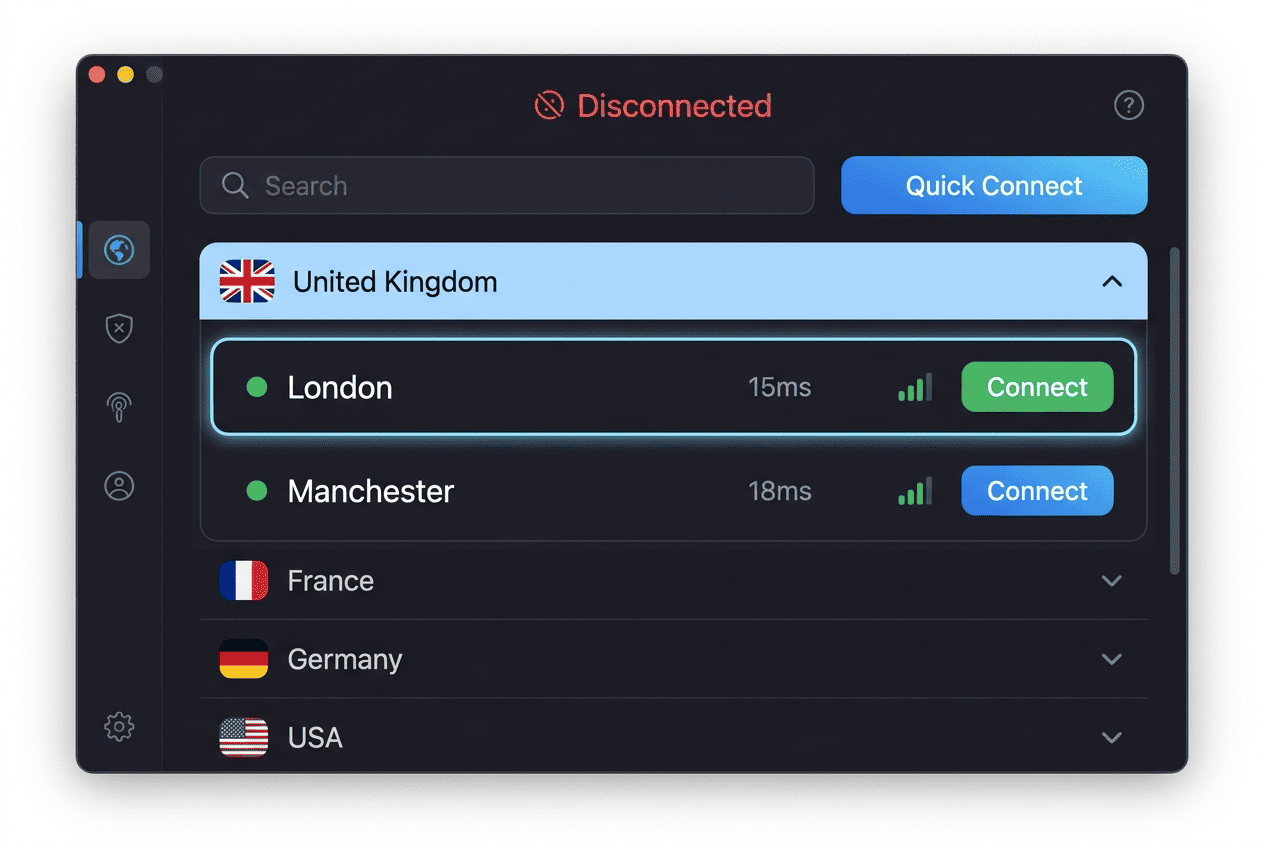
When you connect to a UK server through a VPN, the service routes your traffic through that server, so websites see the server’s British IP address instead of your real one. At the same time, the VPN encrypts the traffic between your device and the server. That combination is why a virtual private network tends to outperform other options for both privacy and streaming.
Here is the standard process:
1. Choose a VPN with UK servers, well-reviewed apps, and a clear privacy policy.
2. Download and install the app on your device.
3. Sign in and open the server list.
4. Select a UK location and connect.
5. Check your new IP address with an online lookup tool.
6. Open the website or app you want to use.
When it works, you will see the lookup page show a UK location, and the target sites may start serving British content or regional services.
There are a few reasons a VPN to get a UK IP usually beats the alternatives. First, most mainstream VPN apps are easy to use on phones, laptops, streaming devices, and browsers. Second, a good VPN can maintain stronger connection speeds than a typical web proxy because the apps and protocol choices are built for full-device traffic, not just one tab. Third, if you want to use VPN to get privacy as well as location switching, encryption matters.
Server choice still matters. The closer and less crowded the server, the better the speed tends to be. Many providers offer multiple UK servers in London, Manchester, or other locations, which gives you fallback options if one address gets blocked or slows down. Good services also support modern protocol choices such as WireGuard, a faster VPN protocol designed to reduce overhead, or their own variants built around the same idea.
If you need to change your IP address for streaming, this is the method I’d start with. A VPN does not guarantee every service will work every time, but it is the most practical tool for connecting to UK locations with a consistent trade-off of access, privacy, and day-to-day usability. For many people, it is also the easiest way to get an IP that fits the region they need without dealing with extra configuration.
Using a Proxy Server to Get a UK IP Address
A proxy server dashboard or browser settings screen is often all that is visible, which makes this method feel simple but less comprehensive than a VPN. Proxy servers handle location switching differently from a VPN, and the gap matters before you commit to one. Unlike a virtual private network, most proxy services do not encrypt your connection. That means the proxy provider can see your traffic in plain text, and so can anyone else sitting between your device and the proxy server. If you care about privacy and security, that is the first limitation to weigh.
The second limitation is scope. A proxy usually covers traffic from one browser tab or app, not your whole device. It stands between you and the destination site, so the site sees the proxy address rather than your real one — but everything outside that session is untouched.
Speed and consistency follow from those constraints. Proxy services can handle lightweight pages, but video traffic, account logins, and modern apps often expose the gaps. Connection quality varies, and free options are especially inconsistent. If your goal is to change your IP for a simple site check, a UK proxy may work. If your goal is to watch video, protect data on public Wi-Fi, or keep a more stable internet connection, it usually falls short.
There is also the matter of trust. A proxy provider still handles your traffic in some form, so its logging policy and infrastructure matter. Many free proxy tools offer thin information about how data is handled. That is not ideal if you care about privacy, security, or routine access across services.
Using Tor to Get a UK IP Address
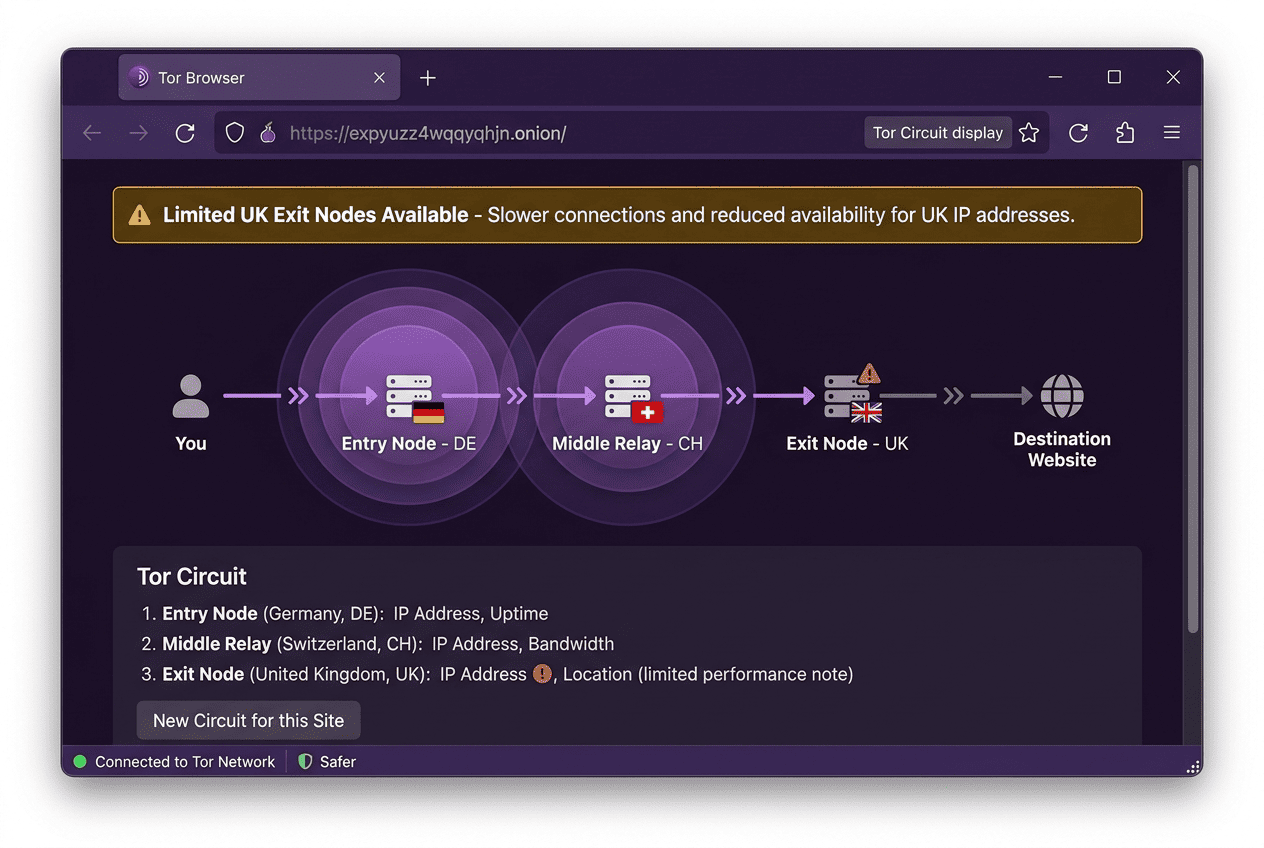
Tor takes a layered approach: it routes your traffic through several volunteer-run servers, often called nodes, to make tracking harder. That design can improve privacy, especially for users who want to separate browsing activity from their home network. In that sense, Tor is useful. But it is not the right answer if your only goal is to get UK IP address access.
Location control is the first problem. Tor does not let you pick a UK exit node the way a VPN lets you choose from servers in countries and cities. Advanced configuration is possible, but it is less direct and less predictable. Speed is the second problem. Because traffic bounces through multiple relays before reaching the destination, Tor is usually much slower than a good VPN.
That makes Tor a poor fit for streaming services, large downloads, and apps that need stable connection speeds. Some websites also block Tor exit nodes outright, which limits access. If you need a tool mainly for private browsing and you accept the trade-offs, Tor can be useful. If you want to VPN to get a UK location for smooth video, general apps, or easier account use, it is the wrong tool for most people. It is also not the best choice if you want fast speeds on a regular basis.
Which method is best for speed, privacy, and streaming?
For most readers, a VPN is the best method. It gives you a clearer way to connect to UK servers, better speed than Tor in normal use, and stronger privacy than a basic proxy. It is also the least fussy option across websites, apps, and streaming services.
A proxy can help with simple browser tasks, but it offers weaker security and less consistent access. Tor can improve privacy for specific browsing needs, yet it is slow and awkward for region-based services. If you are wondering how to get a UK IP with the fewest compromises, use VPN to get the job done, verify the new address, and switch servers if the first location does not perform well. If the connection drops, a kill switch can help stop internet traffic from leaking outside the encrypted tunnel. A good kill switch is especially useful when you are changing networks or using a public hotspot.
Best VPNs for a UK IP Address
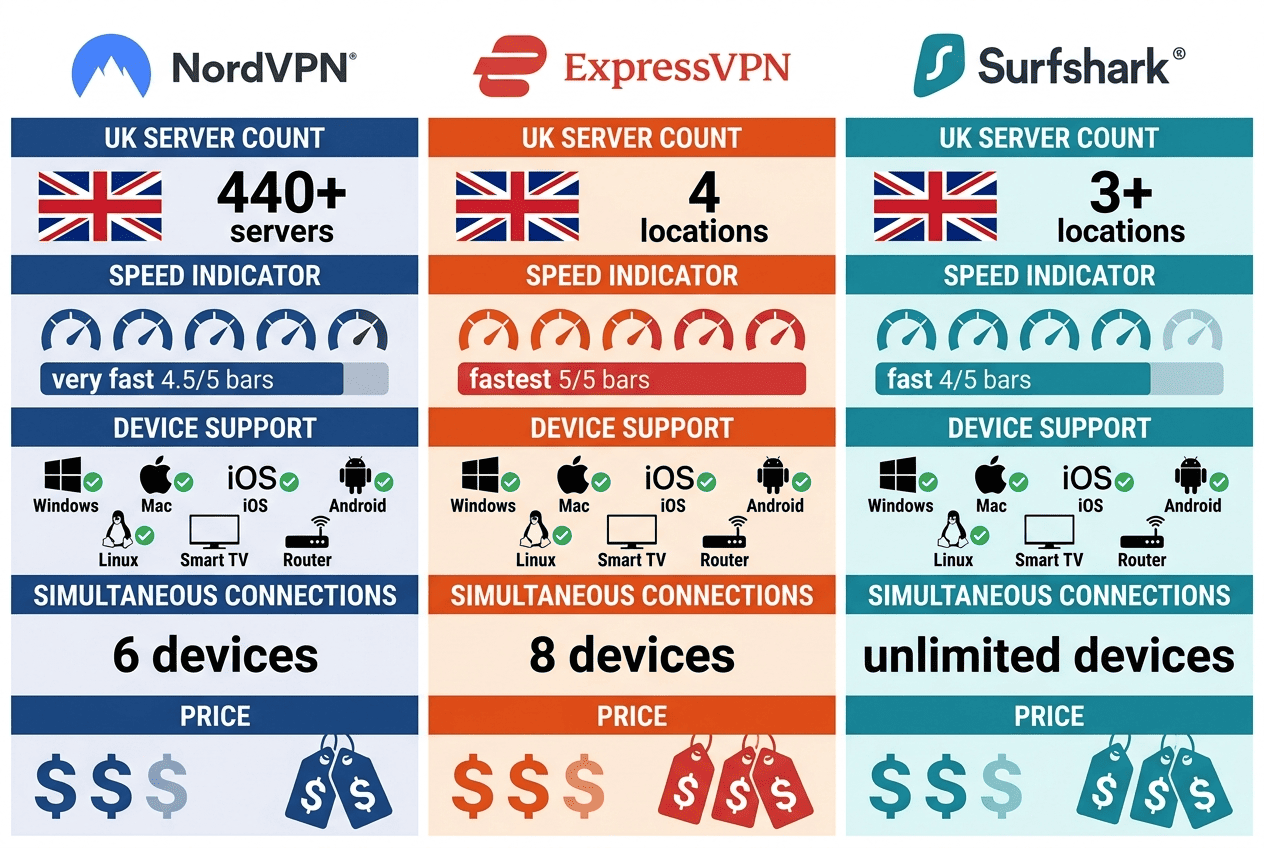
To choose a VPN for a UK IP address, I’d focus on a short list of practical criteria: enough UK servers to avoid congestion, good speed on nearby and long-distance routes, consistent access to UK services, and security features that do not get in your way. You also want clear apps, a reasonable privacy policy, and a money back guarantee in case the service does not suit your device or viewing habits.
Another factor is how the VPN behaves outside a lab. A provider can advertise a huge network, but what matters is whether real server locations perform well, whether connection speeds stay usable at busy hours, and whether the apps remain stable across phones, laptops, smart TVs, and browser extensions. Proxy support can be useful in niche cases, but for most people a full virtual private network is the better tool for a UK IP address.
A provider with optimized servers in the right region can make a noticeable difference, and some plans even let you get an IP that stays consistent for certain use cases. If you need a static IP, check whether the VPN offers that option, because it can help with account verification and fewer re-checks on some services. Some users also compare whether the provider has a kill switch, support for browser tools like the Tor Browser, and features for payment privacy.
Step 1: Shortlist the top UK VPN options
Start with providers that have a proven mix of UK servers, strong security, and dependable speed. In most cases, that means large, established VPN brands with fast protocol options, broad app support, and enough server locations to avoid crowded routes. A money back guarantee matters too because a VPN that looks good on paper may perform differently on your home network, device, or favorite services.
My shortlist would be NordVPN, ExpressVPN, and Surfshark. All three are well-known VPN options with broad server coverage, useful apps, and consistent connection speeds for day-to-day browsing, streaming, and account access. If your main goal is a UK IP address without much friction, these are sensible places to start before you compare finer points like protocol choice, proxy tools, or pricing.
For many readers, a day money back guarantee is the deciding factor when testing a new provider. It lets you sign up, try the connection on your own network, and make sure the service can actually access the sites you care about. That is a useful safety net when you are comparing performance across devices and regions.
How to Check if You Have a UK IP Address
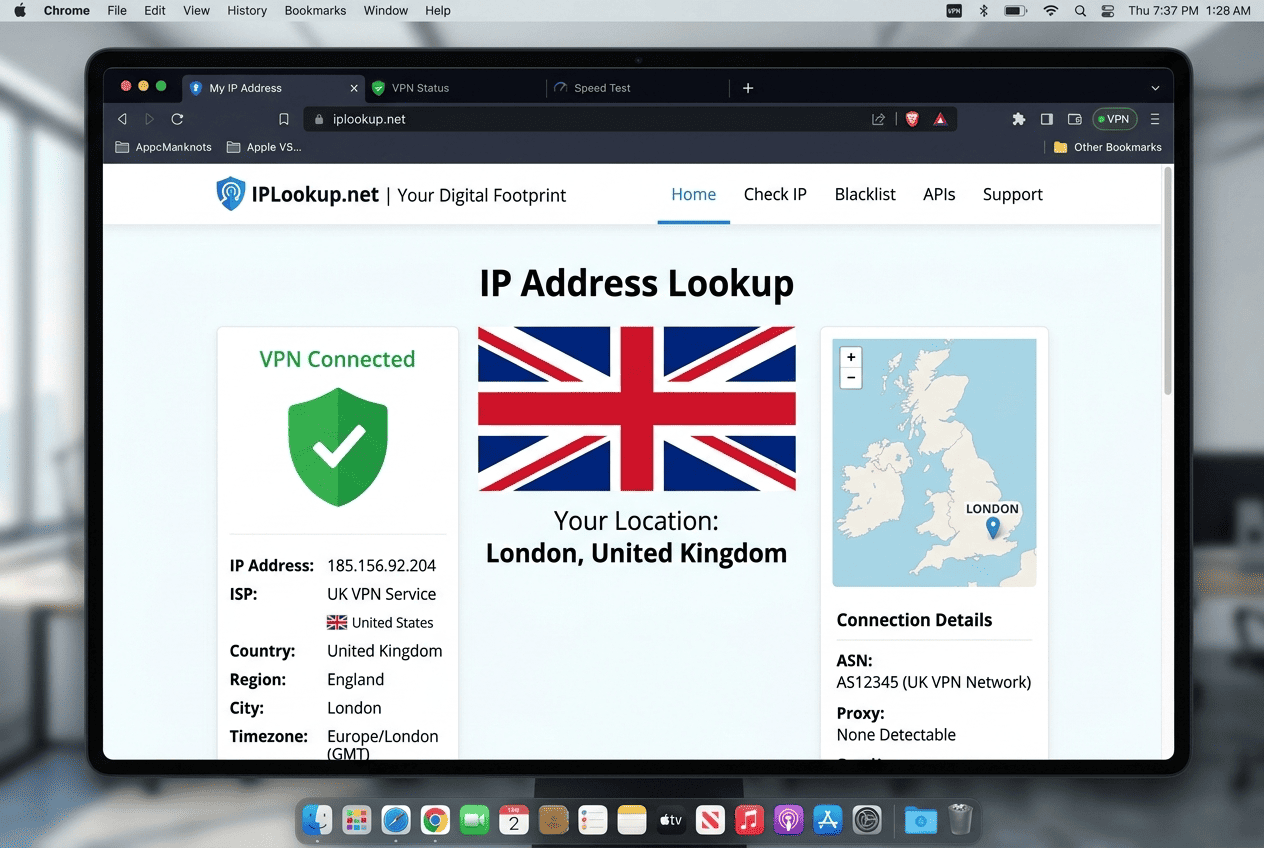
Once you connect, do not assume it worked. Verification takes a minute and saves a lot of confusion. A service may still see your old location because of cached data, browser settings, DNS leaks, or an app that did not fully refresh after the connection changed.
The good news is that checking a UK IP takes very little time. You can confirm the visible address with a lookup tool, compare the result before and after connection, and then test the target website or app. If the UK location does not appear, the fix is often simple.
Check your IP with a lookup tool
Open an IP lookup website before connecting and note your current IP address and country. Then connect to a UK server and refresh the page. If the change worked, the tool should show a new address and list the location as the UK.
This is the quickest answer to how can I tell whether my new address is British. A proper UK IP check compares the before and after result, not just the final page. If the address changes but the country does not, switch servers and test again.
Confirm location in apps and browser settings
Next, open the websites or apps you actually want to use. Some services display local home pages, local recommendations, or country-specific account information. That can confirm whether your visible location changed where it counts.
If a browser still shows the wrong region, refresh the page, reopen the tab, or clear old site data. On mobile, close and relaunch the app. Also check that location permissions are not exposing a non-UK address through GPS or browser settings even while your UK IP is active.
Fix issues if the UK location does not show
If the UK location still does not appear, disconnect and reconnect to another UK server. A different address often solves the problem. You can also clear cookies and cache, then test again in a private browsing window.
If that fails, check for DNS or WebRTC leaks, review device network settings, and confirm the VPN is connected at the system level rather than only inside one app. In short, if the UK result does not show, the usual suspects are the server, the browser, or leftover location data tied to your old IP address. A reputable provider with a day money back guarantee gives you time to test these fixes without risk if the service does not fit your setup.
Is It Legal to Get a UK IP Address?
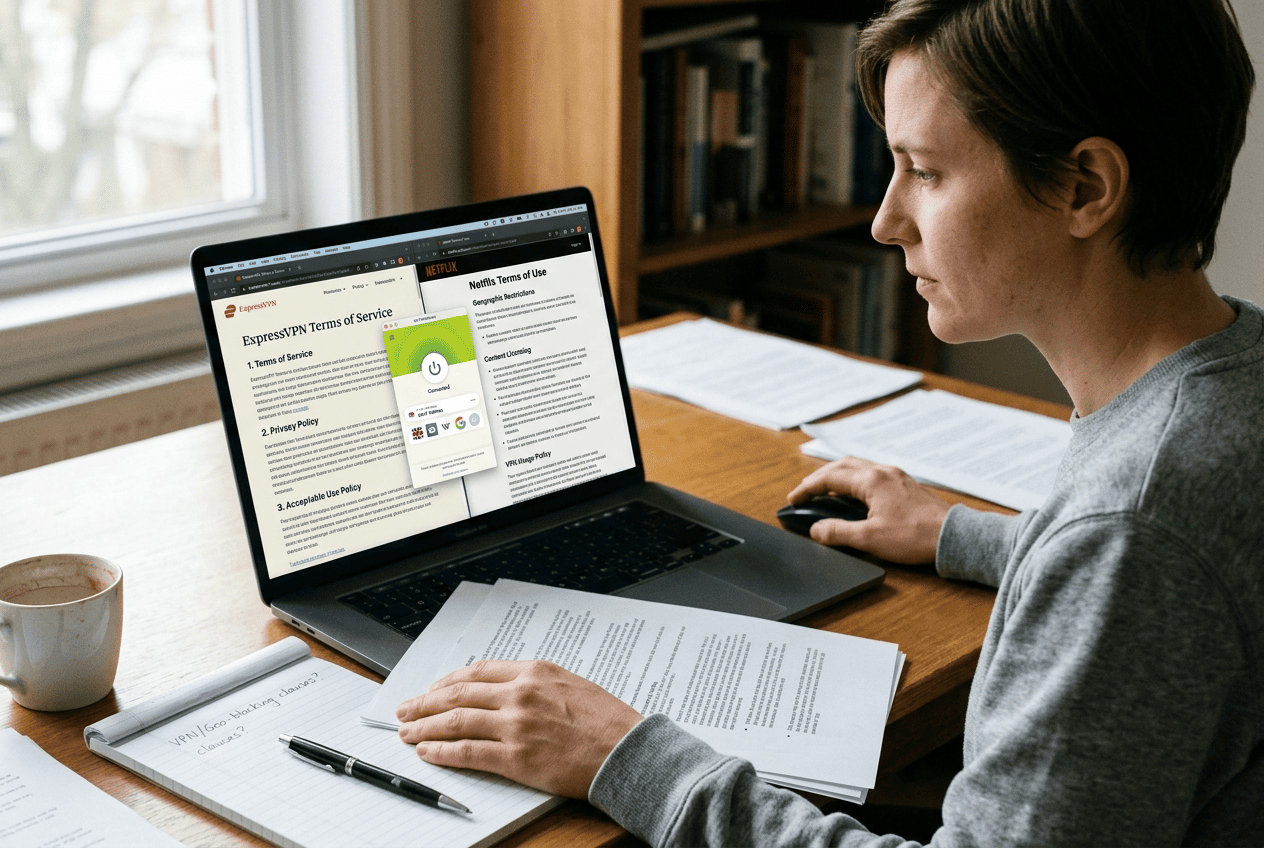
In most places, using a VPN to get UK IP address access is legal by itself. A UK IP is just an address assigned through a remote service, and privacy and security tools are common for personal and business use. The legal problem usually is not the address alone. It is what you do with it, and whether that use conflicts with local law or the rules of the service you are using.
That distinction matters. A VPN provider may offer a money back guarantee or a 30 day money back period, but that says nothing about whether a specific platform allows location shifting under its terms. So it helps to separate legality from account rules.
Legality versus service terms
Using a VPN or other tool to get UK IP address access is generally lawful in countries where VPN use is permitted. The address itself is not contraband; it is just a routing outcome. But a streaming platform, financial service, or workplace system may still forbid certain forms of location masking in its terms.
That means you can legally use UK IP address tools in many cases and still breach a service agreement. Read the service policy before assuming anything. The law and the platform rules are related, but they are not the same thing.
When using a VPN is acceptable
A VPN is widely used for privacy and security on home, public, and work networks. If you use UK IP address routing to protect data on Wi-Fi, secure your connection while traveling, or access your own accounts more safely, that is usually a normal use case.
Many people also get UK IP address access simply to maintain a familiar browsing environment while abroad. The key is to stay within local law and the rules of the services you use. For example, if you are traveling abroad and want to reach your bank account or a company portal, a legitimate VPN connection can be a practical way to maintain access without exposing your session on an unsafe network.
Risks to keep in mind
The main risk is often account-related rather than criminal. A platform may block a session, require extra verification, or restrict content if it detects location mismatches. Banks and streaming apps can be especially sensitive.
A second risk is choosing the wrong provider. A flashy offer and a day money back promise do not guarantee good privacy and security. If you use UK IP address tools for sensitive tasks, check the provider’s policy, server quality, and support options before trusting it with your traffic and account information. If the service depends on online banking, keep an eye on the provider’s logs, app permissions, and any extra features that may affect your personal data.
UK IP Address FAQs
Can I get a UK IP address for free?
Will a UK IP address work with BBC iPlayer?
Is a proxy enough to change my location?
Why does my UK IP keep switching back?
What is the safest way to get a UK IP address?
Do I need a UK server or just a UK IP?
Can I use a UK IP for online banking?



